為 GitHub Actions 建立 PR 描述 Agent
在本指南中,你將建立一個 GitHub Action,使用 Mastra Agent 讀取 Pull Request diff、產生多語言摘要,並直接寫入 GitHub UI 的 PR 描述。每當 Pull Request 建立或更新時,Action 都會執行,並隨着 diff 變更重新產生描述。
這種做法類似 CodeRabbit 及 Greptile 等 AI 驅動的 PR Tool,但它使用原生 GitHub Actions Workflow 及 Mastra Agent 建立。
設定包含三個部分:
- 產生描述的 Mastra Agent
- 由 Pull Request 觸發的 GitHub Actions Workflow
- 將 Workflow 連接至 Agent 的 Node.js 腳本
完成後,Action 會寫入包含英文、西班牙文及日文摘要的描述,每個語言部分均以旗幟表情符號標示,方便快速瀏覽。例如:
🇬🇧 English
This PR integrates Astro into the project, adding configuration files and updating scripts to support Astro development.

🇪🇸 Español
Este PR integra Astro en el proyecto, añadiendo archivos de configuración y actualizando scripts para soportar el desarrollo con Astro.

🇯🇵 日本語
このPRは、Astroをプロジェクトに統合し、Astro開発をサポートするための設定ファイルを追加し、スクリプトを更新します。
開始之前開始之前 的直接連結
- Mastra 項目(請參閱快速入門)
- 受支援的模型 Provider 所提供的 API 金鑰。如沒有偏好,可使用 OpenAI
- Node.js
v22.13.0或更新版本
設定儲存庫機密設定儲存庫機密 的直接連結
Workflow 需要存取模型 Provider 的 API 金鑰。請在 GitHub 中將它加入為儲存庫機密:
-
前往 GitHub 上的儲存庫
-
前往 Settings > Secrets and variables > Actions
-
按一下 New repository secret
-
加入 API 金鑰,名稱設為
OPENAI_API_KEY(或 Provider 所使用的適當金鑰名稱)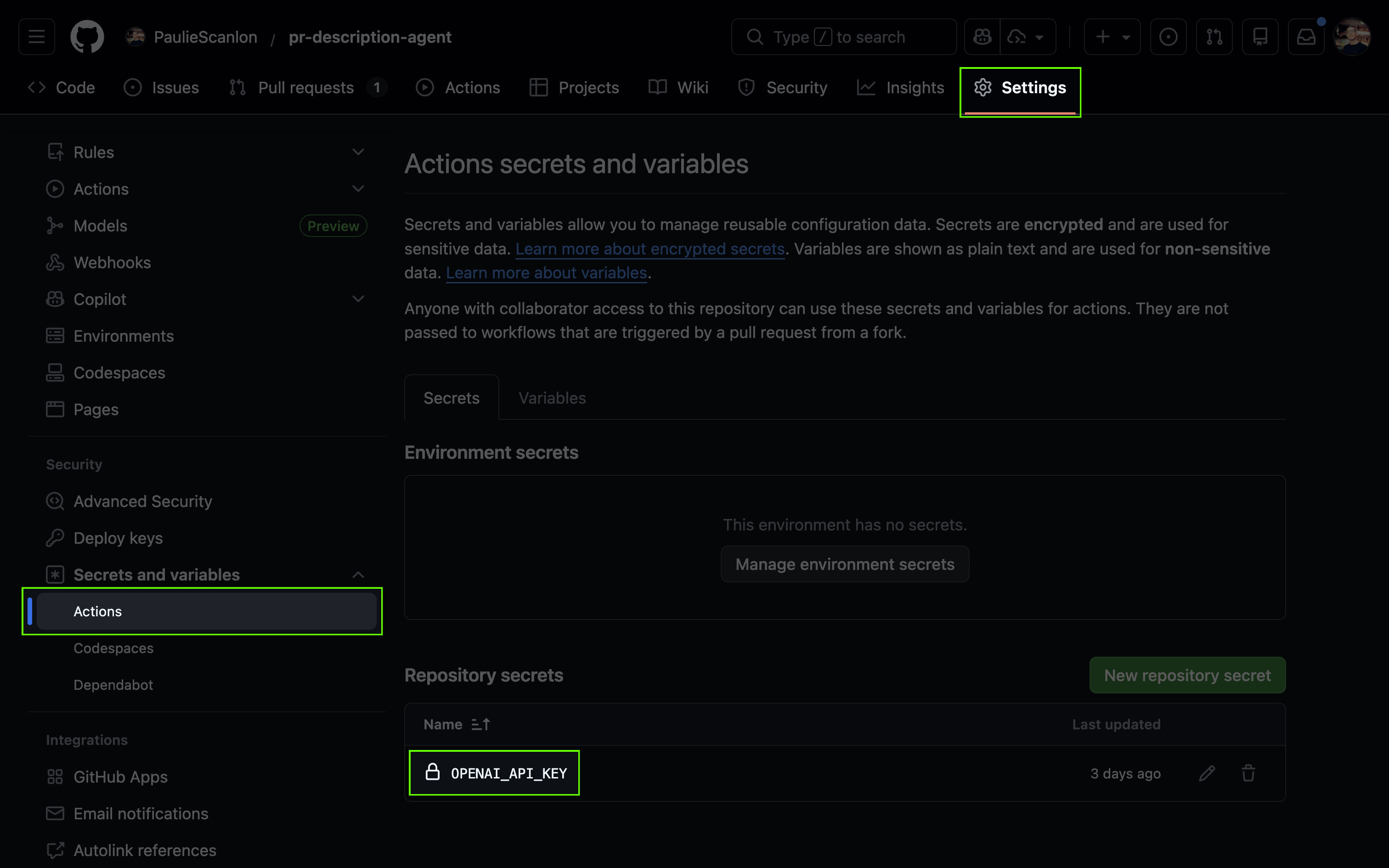
Workflow 以 ${{ secrets.OPENAI_API_KEY }} 參照此機密,並在執行期間將它提供給 Mastra Agent。
建立描述 Agent建立描述 Agent 的直接連結
PR 描述 Agent 負責將 git diff 轉換為清晰且方便審閱者閱讀的 Pull Request 描述。
這個 Agent 會接收 Pull Request 的原始 diff。它會以設定的語言產生描述,並使用旗幟表情符號格式化輸出,讓 PR 中每個語言部分都易於快速瀏覽。
import { Agent } from '@mastra/core/agent'

export const descriptionAgent = new Agent({
  id: 'description-agent',
  name: 'PR Description Agent',
  instructions: `You are a helpful assistant that creates clear, concise PR descriptions.

When given a git diff of changed files, you will:
1. Analyze the changes to understand what was modified
2. Write a brief summary and list of changes
3. Output the same content in English, Spanish, and Japanese

Guidelines:
- Be concise but informative
- Focus on the "what" and "why" of changes
- Use technical terms appropriately
- Keep bullet points short and scannable
- Each language section should contain the same information, naturally translated

Output format:

### 🇬🇧 English

[1-2 sentence summary]

- [Change 1]
- [Change 2]
- [Change 3]

---

### 🇪🇸 Español

[Same summary in Spanish]

- [Same changes in Spanish]

---

### 🇯🇵 日本語

[Same summary in Japanese]

- [Same changes in Japanese]
`,
  model: 'openai/gpt-5.6-sol',
})
在本機測試 Agent在本機測試 Agent 的直接連結
部署 Workflow 前,你可以在 Studio 中測試 Agent,以確認它能正確產生描述。
-
在任何公開 GitHub PR 的 URL 後加上
.diff,以取得 diff:https://github.com/owner/repo/pull/123.diff -
在 Studio 中開啟 PR Description Agent,然後貼上 diff 內容及以下提示:
「請為以下變更建立 PR 描述。<paste the diff content here>」
Agent 會傳回格式化的描述,其中包含英文、西班牙文及日文部分。
GitHub ActionsGitHub Actions 的直接連結
GitHub Actions 會在 GitHub 基礎設施上的短期環境中執行 Workflow。每次執行都會從全新的虛擬機器開始,並取出你的程式碼。它會先安裝依賴套件,再執行 Workflow 步驟。執行完成後,環境便會關閉。除非你明確將內容儲存為成品或快取,否則不會有任何內容保留至下次執行。
建立 Workflow建立 Workflow 的直接連結
GitHub Actions Workflow 位於 .github/workflows 目錄。在項目根目錄建立 .github 目錄,然後在當中建立 workflows 目錄。加入 pr-description.yml。
每當 Pull Request 開啟或更新時,這個 Workflow 都會執行。它會為 PR 產生 diff、呼叫 Mastra Agent 描述變更,然後直接將描述寫入 GitHub UI 中的 PR。
name: PR Description Generator

on:
  pull_request:
    types: [opened, synchronize]

permissions:
  contents: read
  pull-requests: write

env:
  GH_TOKEN: ${{ secrets.GITHUB_TOKEN }}
  OPENAI_API_KEY: ${{ secrets.OPENAI_API_KEY }}
  PR_DIFF_FILE: /tmp/pr_diff.txt
  PR_DESCRIPTION_FILE: /tmp/pr_description.md

jobs:
  generate-description:
    runs-on: ubuntu-latest
    steps:
      - uses: actions/checkout@v4
        with:
          fetch-depth: 0

      - uses: actions/setup-node@v4
        with:
          node-version: '22'
          cache: 'npm'

      - run: npm ci

      - id: pr
        run: |
          BASE_REF=$(gh pr view ${{ github.event.pull_request.number }} --json baseRefName -q '.baseRefName')
          git fetch origin $BASE_REF
          git diff origin/$BASE_REF...HEAD -- . ':!package-lock.json' > $PR_DIFF_FILE

      - run: npx tsx .github/scripts/generate-description.ts

      - run: gh pr edit ${{ github.event.pull_request.number }} --body-file $PR_DESCRIPTION_FILE
Workflow 說明Workflow 說明 的直接連結
on: pull_request:在 Pull Request 開啟或更新時執行。permissions: pull-requests: write:允許 Workflow 更新 PR 描述。env:定義各步驟共用的檔案路徑,並從儲存庫機密讀取所需值,包括 Mastra Agent 使用的模型 API 金鑰。actions/checkout@v4+ git 指令:取出完整的儲存庫歷史記錄、擷取 PR 基礎分支,並將 PR diff 寫入/tmp/pr_diff.txt。actions/setup-node@v4:設定 Workflow 使用的 Node.js 執行環境。npm ci:根據鎖定檔安裝儲存庫的 Node.js 依賴套件。generate-description.ts:讀取/tmp/pr_diff.txt、呼叫 Mastra Agent,並將產生的描述寫入/tmp/pr_description.md。gh pr edit:使用/tmp/pr_description.md的內容更新 Pull Request 描述。
Workflow 產生 diff 時會排除 package-lock.json。鎖定檔通常很大且充滿雜訊,加入它們可能會佔滿 Agent 的上下文視窗,令產生的描述更難理解。
建立 Workflow 腳本建立 Workflow 腳本 的直接連結
在 .github 內建立 scripts 目錄,並加入 generate-description.ts。
這個腳本會從 PR_DIFF_FILE 讀取 PR diff、使用 Mastra Agent 產生描述,然後將結果寫入 PR_DESCRIPTION_FILE,供 Workflow 發佈至 Pull Request。
import { readFileSync, writeFileSync } from 'fs'
import { mastra } from '../../src/mastra'

const agent = mastra.getAgent('descriptionAgent')

await agent.generate(
  `Please create a PR description for the following changes.

Git diff:
\`\`\`diff
${readFileSync(process.env.PR_DIFF_FILE!, 'utf-8')}
\`\`\``,
  {
    onError: () => {
      writeFileSync(
        process.env.PR_DESCRIPTION_FILE!,
        'This PR diff is too large to generate a description automatically.',
      )
    },
    onFinish: result => {
      writeFileSync(process.env.PR_DESCRIPTION_FILE!, result.text)
    },
  },
)
Workflow 腳本說明Workflow 腳本說明 的直接連結
mastra.getAgent("descriptionAgent"):取得產生 PR 描述的 Mastra Agent。agent.generate(...):從PR_DIFF_FILE讀取 Pull Request diff,並要求 Agent 撰寫 PR 描述。onError回呼:當 diff 太大而無法處理時,將後備訊息寫入PR_DESCRIPTION_FILE。onFinish回呼:將產生的 PR 描述寫入PR_DESCRIPTION_FILE。
後續步驟後續步驟 的直接連結
你現在已有一個使用 Mastra Agent 產生多語言 PR 描述的 GitHub Action。將 Workflow 及支援檔案合併至主分支後,Agent 會在下次建立或更新 Pull Request 時自動執行。你可以在儲存庫的 Actions 分頁中監察執行情況。
接下來,你可以自訂 Agent 指示或更改輸出語言,也可以擴充 Workflow 以處理其他事件。
進一步了解:
- 閱讀 Agent 文件
- 為 Agent 提供 Tool,以擷取額外上下文
- 探索其他 GitHub Actions 觸發條件,例如 issue 留言或版本發佈