제어 흐름
Workflow는 미리 정의된 일련의 작업을 실행하며 해당 흐름이 실행되는 방식을 제어할 수 있습니다. 작업은 다음과 같이 나뉩니다.steps, 요구 사항에 따라 다양한 방식으로 실행될 수 있습니다. 순차적으로 또는 병렬로 실행될 수도 있고 조건에 따라 다른 경로를 따를 수도 있습니다.
각 단계는 데이터를 제어하고 일관성을 유지하는 정의된 스키마를 통해 Workflow의 다음 단계와 연결됩니다.
핵심 원칙핵심 원칙에 대한 직접 링크
- 첫 번째 단계는
inputSchemamust match the workflow’sinputSchema. - 마지막 단계는
outputSchemamust match the workflow’soutputSchema. - 각 단계의
outputSchemamust match the next step’sinputSchema.- 그렇지 않은 경우 다음을 사용하십시오.Input data mapping 를 사용해 데이터를 필요한 형태로 변환합니다.
단계 연결.then()chaining-steps-with-then에 대한 직접 링크
사용.then() 를 사용해 단계를 순서대로 실행하여 각 단계가 바로 이전 단계의 결과에 접근할 수 있도록 합니다.

const step1 = createStep({
  inputSchema: z.object({
    message: z.string(),
  }),
  outputSchema: z.object({
    formatted: z.string(),
  }),
})

const step2 = createStep({
  inputSchema: z.object({
    formatted: z.string(),
  }),
  outputSchema: z.object({
    emphasized: z.string(),
  }),
})

export const testWorkflow = createWorkflow({
  inputSchema: z.object({
    message: z.string(),
  }),
  outputSchema: z.object({
    emphasized: z.string(),
  }),
})
  .then(step1)
  .then(step2)
  .commit()
동시 단계.parallel()simultaneous-steps-with-parallel에 대한 직접 링크
사용.parallel() 를 사용해 단계를 동시에 실행합니다. Workflow가 다음 단계로 진행되기 전에 모든 병렬 단계가 완료되어야 합니다. 각 단계의 id is used when defining a following step's inputSchema and becomes the key on the inputData 이전 단계의 값에 접근하는 데 사용하는 객체입니다. 이후 단계에서 병렬 단계의 출력을 참조하거나 결합할 수 있습니다.

const step1 = createStep({
  id: 'step-1',
})

const step2 = createStep({
  id: 'step-2',
})

const step3 = createStep({
  id: 'step-3',
  inputSchema: z.object({
    'step-1': z.object({
      formatted: z.string(),
    }),
    'step-2': z.object({
      emphasized: z.string(),
    }),
  }),
  outputSchema: z.object({
    combined: z.string(),
  }),
  execute: async ({ inputData }) => {
    const { formatted } = inputData['step-1']
    const { emphasized } = inputData['step-2']
    return {
      combined: `${formatted} | ${emphasized}`,
    }
  },
})

export const testWorkflow = createWorkflow({
  inputSchema: z.object({
    message: z.string(),
  }),
  outputSchema: z.object({
    combined: z.string(),
  }),
})
  .parallel([step1, step2])
  .then(step3)
  .commit()
출력 구조출력 구조에 대한 직접 링크
단계가 병렬로 실행되면 출력은 각 키가 단계의 키인 객체입니다.id 이고 값은 해당 단계의 출력입니다. 각 병렬 단계의 결과에 개별적으로 접근할 수 있습니다.
const step1 = createStep({
  id: 'format-step',
  inputSchema: z.object({ message: z.string() }),
  outputSchema: z.object({ formatted: z.string() }),
  execute: async ({ inputData }) => ({
    formatted: inputData.message.toUpperCase(),
  }),
})

const step2 = createStep({
  id: 'count-step',
  inputSchema: z.object({ message: z.string() }),
  outputSchema: z.object({ count: z.number() }),
  execute: async ({ inputData }) => ({
    count: inputData.message.length,
  }),
})

const step3 = createStep({
  id: 'combine-step',
  // The inputSchema must match the structure of parallel outputs
  inputSchema: z.object({
    'format-step': z.object({ formatted: z.string() }),
    'count-step': z.object({ count: z.number() }),
  }),
  outputSchema: z.object({ result: z.string() }),
  execute: async ({ inputData }) => {
    // Access each parallel step's output by its id
    const formatted = inputData['format-step'].formatted
    const count = inputData['count-step'].count
    return {
      result: `${formatted} (${count} characters)`,
    }
  },
})

export const testWorkflow = createWorkflow({
  id: 'parallel-output-example',
  inputSchema: z.object({ message: z.string() }),
  outputSchema: z.object({ result: z.string() }),
})
  .parallel([step1, step2])
  .then(step3)
  .commit()

// When executed with { message: "hello" }
// The parallel output structure will be:
// {
//   "format-step": { formatted: "HELLO" },
//   "count-step": { count: 5 }
// }
핵심 사항:
- 각 병렬 단계의 출력은 해당 단계에 따라 결정됩니다.
id - 모든 병렬 단계가 동시에 실행됩니다.
- 다음 단계는 모든 병렬 단계 출력을 포함하는 객체를 받습니다.
- 다음을 정의해야 합니다.
inputSchema를 이 구조와 일치하도록 다음 단계에서 지정합니다
단계 실패 처리단계 실패 처리에 대한 직접 링크
병렬 단계에서 오류가 발생하면 전체 병렬 블록이 실패합니다. 예를 들어 만료된 인증 토큰이 있을 수 있는 여러 연구 Agent와 같이 일부 단계가 실패할 수 있는 탄력적인 병렬 Workflow를 구축하려면 try/catch를 사용하여 단계 자체 내부의 오류를 처리합니다.
const resilientStep = createStep({
  id: 'researcher',
  inputSchema: z.object({ query: z.string() }),
  outputSchema: z.object({
    brief: z.string().nullable(),
    failed: z.boolean(),
  }),
  execute: async ({ inputData }) => {
    try {
      const result = await fetchExternalData(inputData.query)
      return { brief: result, failed: false }
    } catch {
      return { brief: null, failed: true }
    }
  },
})
이런 방식으로 단계는 항상 입력된 결과로 성공하고 다운스트림 단계는 실패한 결과를 필터링할 수 있습니다.
const writerStep = createStep({
  id: 'writer',
  inputSchema: z.object({
    'researcher-a': z.object({ brief: z.string().nullable(), failed: z.boolean() }),
    'researcher-b': z.object({ brief: z.string().nullable(), failed: z.boolean() }),
  }),
  outputSchema: z.object({ synthesis: z.string() }),
  execute: async ({ inputData }) => {
    const briefs = Object.values(inputData)
      .filter(v => !v.failed && v.brief)
      .map(v => v.brief)
    return { synthesis: briefs.join('; ') }
  },
})
방문하다Choosing the right pattern to understand when to use .parallel() vs .foreach().
조건부 논리.branch()conditional-logic-with-branch에 대한 직접 링크
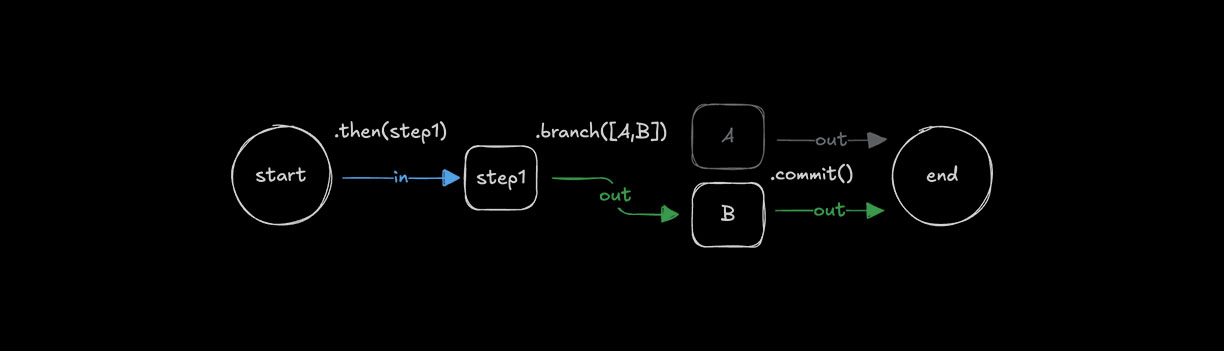
사용.branch() 를 사용해 조건에 따라 실행할 단계를 선택합니다. 분기의 모든 단계에는 동일한 inputSchema and outputSchema 가 필요합니다. 분기를 사용하려면 Workflow가 서로 다른 경로를 따를 수 있도록 스키마가 일관되어야 하기 때문입니다.
const step1 = createStep({...})

const stepA = createStep({
  inputSchema: z.object({
    value: z.number()
  }),
  outputSchema: z.object({
    result: z.string()
  })
});

const stepB = createStep({
  inputSchema: z.object({
    value: z.number()
  }),
  outputSchema: z.object({
    result: z.string()
  })
});

export const testWorkflow = createWorkflow({
  inputSchema: z.object({
    value: z.number()
  }),
  outputSchema: z.object({
    result: z.string()
  })
})
  .then(step1)
  .branch([
    [async ({ inputData: { value } }) => value > 10, stepA],
    [async ({ inputData: { value } }) => value <= 10, stepB]
  ])
  .commit();
출력 구조출력 구조에 대한 직접 링크
조건 분기를 사용하는 경우 조건이 평가되는 기준에 따라 하나의 분기만 실행됩니다.true first. The output structure is similar to .parallel(), 여기서 결과는 실행된 단계의 id.
const step1 = createStep({
  id: 'initial-step',
  inputSchema: z.object({ value: z.number() }),
  outputSchema: z.object({ value: z.number() }),
  execute: async ({ inputData }) => inputData,
})

const highValueStep = createStep({
  id: 'high-value-step',
  inputSchema: z.object({ value: z.number() }),
  outputSchema: z.object({ result: z.string() }),
  execute: async ({ inputData }) => ({
    result: `High value: ${inputData.value}`,
  }),
})

const lowValueStep = createStep({
  id: 'low-value-step',
  inputSchema: z.object({ value: z.number() }),
  outputSchema: z.object({ result: z.string() }),
  execute: async ({ inputData }) => ({
    result: `Low value: ${inputData.value}`,
  }),
})

const finalStep = createStep({
  id: 'final-step',
  // The inputSchema must account for either branch's output
  inputSchema: z.object({
    'high-value-step': z.object({ result: z.string() }).optional(),
    'low-value-step': z.object({ result: z.string() }).optional(),
  }),
  outputSchema: z.object({ message: z.string() }),
  execute: async ({ inputData }) => {
    // Only one branch will have executed
    const result = inputData['high-value-step']?.result || inputData['low-value-step']?.result
    return { message: result }
  },
})

export const testWorkflow = createWorkflow({
  id: 'branch-output-example',
  inputSchema: z.object({ value: z.number() }),
  outputSchema: z.object({ message: z.string() }),
})
  .then(step1)
  .branch([
    [async ({ inputData }) => inputData.value > 10, highValueStep],
    [async ({ inputData }) => inputData.value <= 10, lowValueStep],
  ])
  .then(finalStep)
  .commit()

// When executed with { value: 15 }
// Only the high-value-step executes, output structure:
// {
//   "high-value-step": { result: "High value: 15" }
// }

// When executed with { value: 5 }
// Only the low-value-step executes, output structure:
// {
//   "low-value-step": { result: "Low value: 5" }
// }
핵심 사항:
- 조건 평가 순서에 따라 하나의 분기만 실행됩니다.
- 출력은 실행된 단계에 따라 결정됩니다.
id - 후속 단계에서는 가능한 모든 분기 출력을 처리해야 합니다.
- 다음에서 선택 필드를 사용하세요.
inputSchema를 키로 사용합니다. 다음 단계에서 가능한 여러 분기를 처리해야 할 때 사용합니다 - 조건은 정의된 순서대로 평가됩니다.
입력 데이터 매핑입력 데이터 매핑에 대한 직접 링크
사용시.then(), .parallel(), or .branch(), 이전 단계의 출력을 다음 단계의 입력에 맞게 변환해야 하는 경우가 있습니다. 이런 경우 .map() to access the inputData 를 사용해 이를 변환하여 다음 단계에 적합한 데이터 형태를 만들 수 있습니다.

const step1 = createStep({...});
const step2 = createStep({...});

export const testWorkflow = createWorkflow({...})
  .then(step1)
  .map(async ({ inputData }) => {
    const { foo } = inputData;
    return {
      bar: `new ${foo}`,
    };
  })
  .then(step2)
  .commit();
그만큼.map() 메서드는 더 복잡한 매핑 시나리오를 위한 추가 헬퍼 함수를 제공합니다.
사용 가능한 도우미 기능:
getStepResult(): 특정 단계의 전체 출력에 액세스합니다.getInitData<any>(): Workflow의 초기 입력 데이터에 액세스합니다.mapVariable(): 선언적 개체 구문을 사용하여 필드를 추출하고 이름을 바꿉니다.
병렬 및 분기 출력병렬 및 분기 출력에 대한 직접 링크
함께 일할 때.parallel() or .branch() outputs, you can use .map() 를 사용해 다음 단계로 전달하기 전에 데이터 구조를 변환합니다. 출력을 평탄화하거나 재구성해야 할 때 특히 유용합니다.
export const testWorkflow = createWorkflow({...})
  .parallel([step1, step2])
  .map(async ({ inputData }) => {
    // Transform the parallel output structure
    return {
      combined: `${inputData["step1"].value} - ${inputData["step2"].value}`
    };
  })
  .then(nextStep)
  .commit();
에서 제공하는 도우미 기능을 사용할 수도 있습니다..map():
export const testWorkflow = createWorkflow({...})
  .branch([
    [condition1, stepA],
    [condition2, stepB]
  ])
  .map(async ({ inputData, getStepResult }) => {
    // Access specific step results
    const stepAResult = getStepResult("stepA");
    const stepBResult = getStepResult("stepB");

    // Return the result from whichever branch executed
    return stepAResult || stepBResult;
  })
  .then(nextStep)
  .commit();
반복 단계반복 단계에 대한 직접 링크
Workflow는 조건이 충족될 때까지 단계를 반복하거나 배열을 반복할 수 있는 다양한 루프 방법을 지원합니다. 루프는 다음과 같은 다른 제어 방법과 결합될 수 있습니다..then().
루핑.dountil()looping-with-dountil에 대한 직접 링크
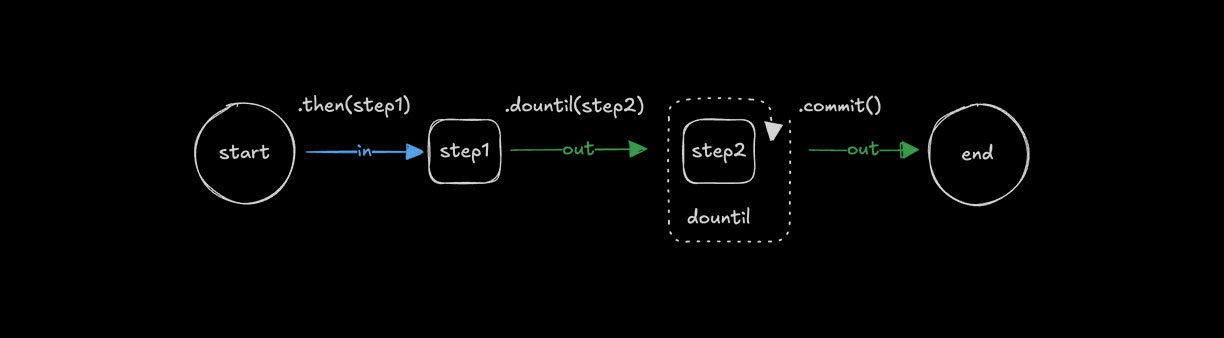
사용.dountil() 를 사용해 조건이 참이 될 때까지 단계를 반복 실행합니다.
const step1 = createStep({...});

const step2 = createStep({
  execute: async ({ inputData }) => {
    const { number } = inputData;
    return {
      number: number + 1
    };
  }
});

export const testWorkflow = createWorkflow({})
  .then(step1)
  .dountil(step2, async ({ inputData: { number } }) => number > 10)
  .commit();
루핑.dowhile()looping-with-dowhile에 대한 직접 링크
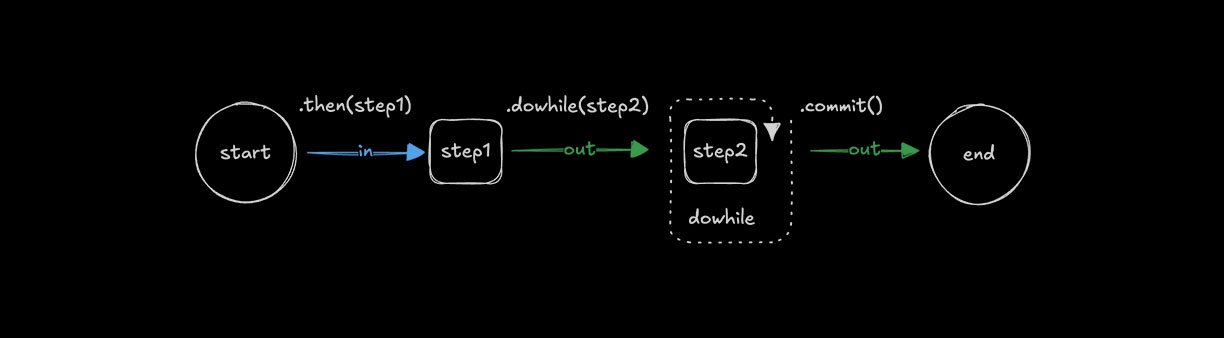
사용.dowhile() 를 사용해 조건이 참인 동안 단계를 반복 실행합니다.
const step1 = createStep({...});

const step2 = createStep({
  execute: async ({ inputData }) => {
    const { number } = inputData;
    return {
      number: number + 1
    };
  }
});

export const testWorkflow = createWorkflow({})
  .then(step1)
  .dowhile(step2, async ({ inputData: { number } }) => number < 10)
  .commit();
루핑.foreach()looping-with-foreach에 대한 직접 링크
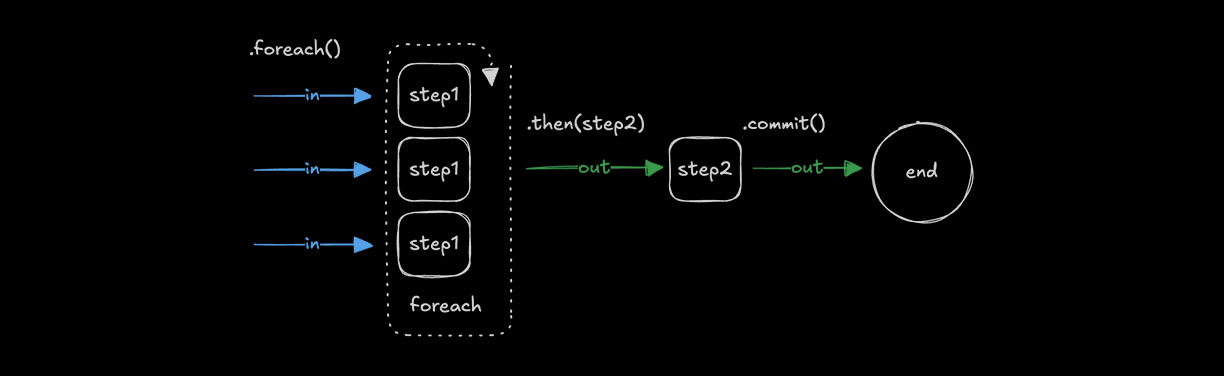
사용.foreach() 를 사용해 배열의 각 항목에 동일한 단계를 실행합니다. 루프가 값을 순회하며 각 값에 단계의 로직을 적용할 수 있도록 입력은 array 타입이어야 합니다. 자세한 내용은 Choosing the right pattern for guidance on when to use .foreach() vs other methods.
const step1 = createStep({
  inputSchema: z.string(),
  outputSchema: z.string(),
  execute: async ({ inputData }) => {
    return inputData.toUpperCase();
  }
});

const step2 = createStep({...});

export const testWorkflow = createWorkflow({
  inputSchema: z.array(z.string()),
  outputSchema: z.array(z.string())
})
  .foreach(step1)
  .then(step2)
  .commit();
출력 구조출력 구조에 대한 직접 링크
그만큼.foreach() 메서드는 항상 각 반복의 출력이 포함된 배열을 반환합니다. 출력 순서는 입력 순서와 일치합니다.
const addTenStep = createStep({
  id: 'add-ten',
  inputSchema: z.object({ value: z.number() }),
  outputSchema: z.object({ value: z.number() }),
  execute: async ({ inputData }) => ({
    value: inputData.value + 10,
  }),
})

export const testWorkflow = createWorkflow({
  id: 'foreach-output-example',
  inputSchema: z.array(z.object({ value: z.number() })),
  outputSchema: z.array(z.object({ value: z.number() })),
})
  .foreach(addTenStep)
  .commit()

// When executed with [{ value: 1 }, { value: 22 }, { value: 333 }]
// Output: [{ value: 11 }, { value: 32 }, { value: 343 }]
동시성 제한동시성 제한에 대한 직접 링크
사용concurrency 를 사용해 처리할 배열 항목 수를 제어합니다. 기본값은 1이며, 이 경우 단계가 순차적으로 실행됩니다. 값을 늘리면 .foreach() to process multiple items simultaneously.
const step1 = createStep({...})

export const testWorkflow = createWorkflow({...})
  .foreach(step1, { concurrency: 4 })
  .commit();
이후 결과 집계.foreach()aggregating-results-after-foreach에 대한 직접 링크
부터.foreach() outputs an array, you can use .then() or .map() 를 사용해 결과를 집계하거나 변환할 수 있습니다. .foreach() receives the entire array as its input.
const processItemStep = createStep({
  id: 'process-item',
  inputSchema: z.object({ value: z.number() }),
  outputSchema: z.object({ processed: z.number() }),
  execute: async ({ inputData }) => ({
    processed: inputData.value * 2,
  }),
})

const aggregateStep = createStep({
  id: 'aggregate',
  // Input is an array of outputs from foreach
  inputSchema: z.array(z.object({ processed: z.number() })),
  outputSchema: z.object({ total: z.number() }),
  execute: async ({ inputData }) => ({
    // Sum all processed values
    total: inputData.reduce((sum, item) => sum + item.processed, 0),
  }),
})

export const testWorkflow = createWorkflow({
  id: 'foreach-aggregate-example',
  inputSchema: z.array(z.object({ value: z.number() })),
  outputSchema: z.object({ total: z.number() }),
})
  .foreach(processItemStep)
  .then(aggregateStep) // Receives the full array from foreach
  .commit()

// When executed with [{ value: 1 }, { value: 2 }, { value: 3 }]
// After foreach: [{ processed: 2 }, { processed: 4 }, { processed: 6 }]
// After aggregate: { total: 12 }
당신은 또한 사용할 수 있습니다.map() to transform the array output:
export const testWorkflow = createWorkflow({...})
  .foreach(processItemStep)
  .map(async ({ inputData }) => ({
    // Transform the array into a different structure
    values: inputData.map(item => item.processed),
    count: inputData.length
  }))
  .then(nextStep)
  .commit();
여러 체인 연결.foreach() callschaining-multiple-foreach-calls에 대한 직접 링크
체인으로 묶을 때.foreach() 뒤에 오는 단계는 이전 단계의 배열 출력을 받습니다. 여러 호출을 연결하면 각 호출은 이전 단계의 배열 출력에 대해 동작합니다. 배열의 각 항목을 여러 단계에서 순차적으로 변환해야 할 때 유용합니다.
const chunkStep = createStep({
  id: 'chunk',
  // Takes a document, returns an array of chunks
  inputSchema: z.object({ content: z.string() }),
  outputSchema: z.array(z.object({ chunk: z.string() })),
  execute: async ({ inputData }) => {
    // Split document into chunks
    const chunks = inputData.content.match(/.{1,100}/g) || []
    return chunks.map(chunk => ({ chunk }))
  },
})

const embedStep = createStep({
  id: 'embed',
  // Takes a single chunk, returns embedding
  inputSchema: z.object({ chunk: z.string() }),
  outputSchema: z.object({ embedding: z.array(z.number()) }),
  execute: async ({ inputData }) => ({
    embedding: [/* vector embedding */],
  }),
})

// For a single document that produces multiple chunks:
export const singleDocWorkflow = createWorkflow({
  id: 'single-doc-rag',
  inputSchema: z.object({ content: z.string() }),
  outputSchema: z.array(z.object({ embedding: z.array(z.number()) })),
})
  .then(chunkStep) // Returns array of chunks
  .foreach(embedStep) // Process each chunk -> array of embeddings
  .commit()
각각이 여러 청크를 생성하는 여러 문서를 처리하는 경우 다음 옵션이 있습니다.
옵션 1: 일괄 관리를 통해 단일 단계로 모든 문서를 처리합니다.
const downloadAndChunkStep = createStep({
  id: "download-and-chunk",
  inputSchema: z.array(z.string()),  // Array of URLs
  outputSchema: z.array(z.object({ chunk: z.string(), source: z.string() })),
  execute: async ({ inputData: urls }) => {
    // Control batching/parallelization within the step
    const allChunks = [];
    for (const url of urls) {
      const content = await fetch(url).then(r => r.text());
      const chunks = content.match(/.{1,100}/g) || [];
      allChunks.push(...chunks.map(chunk => ({ chunk, source: url })));
    }
    return allChunks;
  }
});

export const multiDocWorkflow = createWorkflow({...})
  .then(downloadAndChunkStep)  // Returns flat array of all chunks
  .foreach(embedStep, { concurrency: 10 })  // Embed each chunk in parallel
  .commit();
옵션 2: 문서 및 집계 청크에 foreach를 사용하고 삽입에 foreach를 사용합니다.
const downloadStep = createStep({
  id: 'download',
  inputSchema: z.string(), // Single URL
  outputSchema: z.object({ content: z.string(), source: z.string() }),
  execute: async ({ inputData: url }) => ({
    content: await fetch(url).then(r => r.text()),
    source: url,
  }),
})

const chunkDocStep = createStep({
  id: 'chunk-doc',
  inputSchema: z.object({ content: z.string(), source: z.string() }),
  outputSchema: z.array(z.object({ chunk: z.string(), source: z.string() })),
  execute: async ({ inputData }) => {
    const chunks = inputData.content.match(/.{1,100}/g) || []
    return chunks.map(chunk => ({ chunk, source: inputData.source }))
  },
})

export const multiDocWorkflow = createWorkflow({
  id: 'multi-doc-rag',
  inputSchema: z.array(z.string()), // Array of URLs
  outputSchema: z.array(z.object({ embedding: z.array(z.number()) })),
})
  .foreach(downloadStep, { concurrency: 5 }) // Download docs in parallel
  .foreach(chunkDocStep) // Chunk each doc -> array of chunk arrays
  .map(async ({ inputData }) => {
    // Flatten nested arrays: [[chunks], [chunks]] -> [chunks]
    return inputData.flat()
  })
  .foreach(embedStep, { concurrency: 10 }) // Embed all chunks
  .commit()
체인 연결의 핵심 사항.foreach():
- 각
.foreach()는 이전 단계의 배열에 대해 동작합니다 - 안으로 한발짝 들어가면
.foreach()가 배열을 반환하면 출력은 중첩 배열이 됩니다 - 사용
.map()with.flat()to flatten nested arrays when needed - 복잡한 RAG 파이프라인의 경우 옵션 1(단일 단계로 일괄 처리 처리)이 더 나은 제어 기능을 제공하는 경우가 많습니다.
foreach 내부의 중첩된 Workflowforeach 내부의 중첩된 Workflow에 대한 직접 링크
이후의 단계.foreach() 는 모든 반복이 완료된 후에만 실행됩니다. 항목마다 여러 작업을 순차적으로 실행해야 한다면 여러 .foreach() 호출을 연결하는 대신 중첩 Workflow를 사용하세요. 이렇게 하면 각 항목의 모든 작업이 함께 유지되고 데이터 흐름이 더 명확해집니다.
// Define a workflow that processes a single document
const processDocumentWorkflow = createWorkflow({
  id: 'process-document',
  inputSchema: z.object({ url: z.string() }),
  outputSchema: z.object({
    embeddings: z.array(z.array(z.number())),
    metadata: z.object({ url: z.string(), chunkCount: z.number() }),
  }),
})
  .then(downloadStep) // Download the document
  .then(chunkStep) // Split into chunks
  .then(embedChunksStep) // Embed all chunks for this document
  .then(formatResultStep) // Format the final output
  .commit()

// Use the nested workflow inside foreach
export const batchProcessWorkflow = createWorkflow({
  id: 'batch-process-documents',
  inputSchema: z.array(z.object({ url: z.string() })),
  outputSchema: z.array(
    z.object({
      embeddings: z.array(z.array(z.number())),
      metadata: z.object({ url: z.string(), chunkCount: z.number() }),
    }),
  ),
})
  .foreach(processDocumentWorkflow, { concurrency: 3 })
  .commit()

// Each document goes through all 4 steps before the next document starts (with concurrency: 1)
// With concurrency: 3, up to 3 documents process their full pipelines in parallel
중첩된 Workflow를 사용하는 이유:
- 더 나은 병렬성: 와 함께
concurrency: N, 여러 항목이 각자의 전체 파이프라인을 동시에 실행합니다. 연결된.foreach().foreach()는 모든 항목을 1단계에서 처리하고 기다린 다음, 모든 항목을 2단계에서 처리합니다. 중첩 Workflow를 사용하면 각 항목이 독립적으로 진행될 수 있습니다 - 결과가 수집되기 전에 한 항목에 대한 모든 단계가 함께 완료됩니다.
- 여러 개보다 깨끗함
.foreach()calls which create nested arrays - 중첩된 각 Workflow 실행은 자체 데이터 흐름과 독립적입니다.
- 항목별 로직을 별도로 테스트하고 재사용하기가 더 쉽습니다.
작동 방식:
- 상위 Workflow는 각 배열 항목을 중첩된 Workflow의 인스턴스에 전달합니다.
- 중첩된 각 Workflow는 해당 항목에 대한 전체 단계 시퀀스를 실행합니다.
- 와 함께
concurrency > 1, multiple nested workflows execute in parallel - 중첩된 Workflow의 최종 출력은 결과 배열의 한 요소가 됩니다.
- 모든 중첩된 Workflow가 완료된 후 상위의 다음 단계는 전체 배열을 받습니다.
올바른 패턴 선택올바른 패턴 선택에 대한 직접 링크
적절한 제어 흐름 방법을 선택하기 위한 참조로 이 섹션을 사용하십시오.
빠른 참조빠른 참조에 대한 직접 링크
| 방법 | 목적 | 입력 | 출력 | 동시성 |
|---|---|---|---|---|
.then(step) | Sequential processing | T | U | N/A (one at a time) |
.parallel([a, b]) | Different operations on same input | T | { a: U, b: V } | All run simultaneously |
.foreach(step) | Same operation on each array item | T[] | U[] | Configurable (default: 1) |
.branch([...]) | Conditional path selection | T | { selectedStep: U } | Only one branch runs |
.parallel()대.foreach()parallel-vs-foreach에 대한 직접 링크
사용.parallel() 서로 다른 처리가 필요한 입력이 하나일 때:
// Same user data processed differently in parallel
workflow.parallel([validateStep, enrichStep, scoreStep]).then(combineResultsStep)
사용.foreach() 동일한 처리가 필요한 입력이 여러 개일 때:
// Multiple URLs each processed the same way
workflow.foreach(downloadStep, { concurrency: 5 }).then(aggregateStep)
중첩된 Workflow를 사용하는 경우중첩된 Workflow를 사용하는 경우에 대한 직접 링크
내부에.foreach()- 각 배열 항목에 여러 순차적 단계가 필요한 경우:
// Each document goes through a full pipeline
const processDocWorkflow = createWorkflow({...})
  .then(downloadStep)
  .then(parseStep)
  .then(embedStep)
  .commit();

workflow.foreach(processDocWorkflow, { concurrency: 3 })
싱글.foreach() keeps the result flat. Chaining .foreach().foreach() creates nested arrays.
내부에.parallel()- 병렬 분기에 자체 다단계 파이프라인이 필요한 경우:
const pipelineA = createWorkflow({...}).then(step1).then(step2).commit();
const pipelineB = createWorkflow({...}).then(step3).then(step4).commit();

workflow.parallel([pipelineA, pipelineB])
체인 패턴체인 패턴에 대한 직접 링크
| 패턴 | 무슨 일이 일어나는가 | 일반적인 사용 사례 |
|---|---|---|
.then().then() | Sequential steps | Simple pipelines |
.parallel().then() | Run in parallel, then combine | Fan-out/fan-in |
.foreach().then() | Process all items, then aggregate | Map-reduce |
.foreach().foreach() | 배열의 배열을 생성함 | 피하는 것이 좋음 - 중첩 Workflow 또는 .map() with .flat() |
.foreach(workflow) | 항목별 전체 파이프라인 | 각 배열 항목에 대한 다단계 처리 |
동기화: 다음 단계는 언제 실행되나요?동기화: 다음 단계는 언제 실행되나요?에 대한 직접 링크
둘 다.parallel() and .foreach() 는 동기화 지점입니다. Workflow의 다음 단계는 모든 병렬 분기 또는 모든 배열 반복이 완료된 후에만 실행됩니다.
workflow
  .parallel([stepA, stepB, stepC]) // All 3 run simultaneously
  .then(combineStep) // Waits for ALL 3 to finish before running
  .commit()

workflow
  .foreach(processStep, { concurrency: 5 }) // Up to 5 items process at once
  .then(aggregateStep) // Waits for ALL items to finish before running
  .commit()
이는 다음을 의미합니다.
.parallel()모든 분기 출력을 객체로 수집한 후 다음 단계로 전달합니다..foreach()모든 반복 출력을 배열로 수집한 후 다음 단계로 전달합니다.- 결과가 완료되면 다음 단계로 "스트리밍"할 수 없습니다.
동시성 동작동시성 동작에 대한 직접 링크
| 방법 | 행동 |
|---|---|
.then() | Sequential - one step at a time |
.parallel() | All branches run simultaneously (no limit option) |
.foreach() | Controlled via { concurrency: N } - default is 1 (sequential) |
Nested workflow in .foreach() | Respects parent's concurrency setting |
성능 팁:I/O 바인딩 작업의 경우.foreach(), increase concurrency to process items in parallel:
// Process up to 10 items simultaneously
workflow.foreach(fetchDataStep, { concurrency: 10 })
루프 관리루프 관리에 대한 직접 링크
루프 조건은 루프 종료 방법에 따라 다양한 방식으로 구현될 수 있습니다.
공통 패턴 확인 값이 반환됨inputData 하고 최대 반복 횟수를 설정합니다. 제한에 도달하면 실행을 중단할 수도 있습니다.
루프 중단루프 중단에 대한 직접 링크
사용iterationCount 하여 루프 실행 횟수를 제한합니다. 횟수가 설정한 임계값을 초과하면 오류를 발생시켜 단계를 실패 처리하고 Workflow를 중지합니다.
const step1 = createStep({...});

export const testWorkflow = createWorkflow({...})
  .dountil(step1, async ({ inputData: { userResponse, iterationCount } }) => {
    if (iterationCount >= 10) {
      throw new Error("Maximum iterations reached");
    }
    return userResponse === "yes";
  })
  .commit();