GitHub Actions 用 PR description Agent の構築
このガイドでは、Mastra Agent で pull request の diff を読み取り、多言語の要約を生成して、GitHub UI の PR description に直接書き込む GitHub Action を構築します。この Action は pull request の作成時または更新時に実行され、diff の変更に合わせて description を再生成します。
これは CodeRabbit や Greptile のような AI ベースの PR Tool に似たアプローチですが、GitHub Actions の標準ワークフローと Mastra Agent を使って構築します。
セットアップは次の 3 つで構成されます。
- description を生成する Mastra Agent
- pull request で起動する GitHub Actions ワークフロー
- ワークフローと Agent を接続する Node.js スクリプト
完成した Action は、英語、スペイン語、日本語の要約を含む description を書き込みます。各言語には、ひと目で識別できるよう国旗の絵文字が付きます。例:
🇬🇧 English
This PR integrates Astro into the project, adding configuration files and updating scripts to support Astro development.

🇪🇸 Español
Este PR integra Astro en el proyecto, añadiendo archivos de configuración y actualizando scripts para soportar el desarrollo con Astro.

🇯🇵 日本語
このPRは、Astroをプロジェクトに統合し、Astro開発をサポートするための設定ファイルを追加し、スクリプトを更新します。
はじめる前にはじめる前にへの直接リンク
- Mastra プロジェクト(Quickstartを参照)
- サポートされている モデル Provider の API キー。特に希望がなければ OpenAI を使用してください
- Node.js
v22.13.0以降
Repository secret の設定Repository secret の設定への直接リンク
ワークフローからモデル Provider の API キーにアクセスできるようにする必要があります。GitHub でリポジトリ secret として追加します。
-
GitHub でリポジトリを開きます
-
Settings > Secrets and variables > Actions に移動します
-
New リポジトリ secret をクリックします
-
API キーを
OPENAI_API_KEYという名前(または provider に応じた適切な名前)で追加します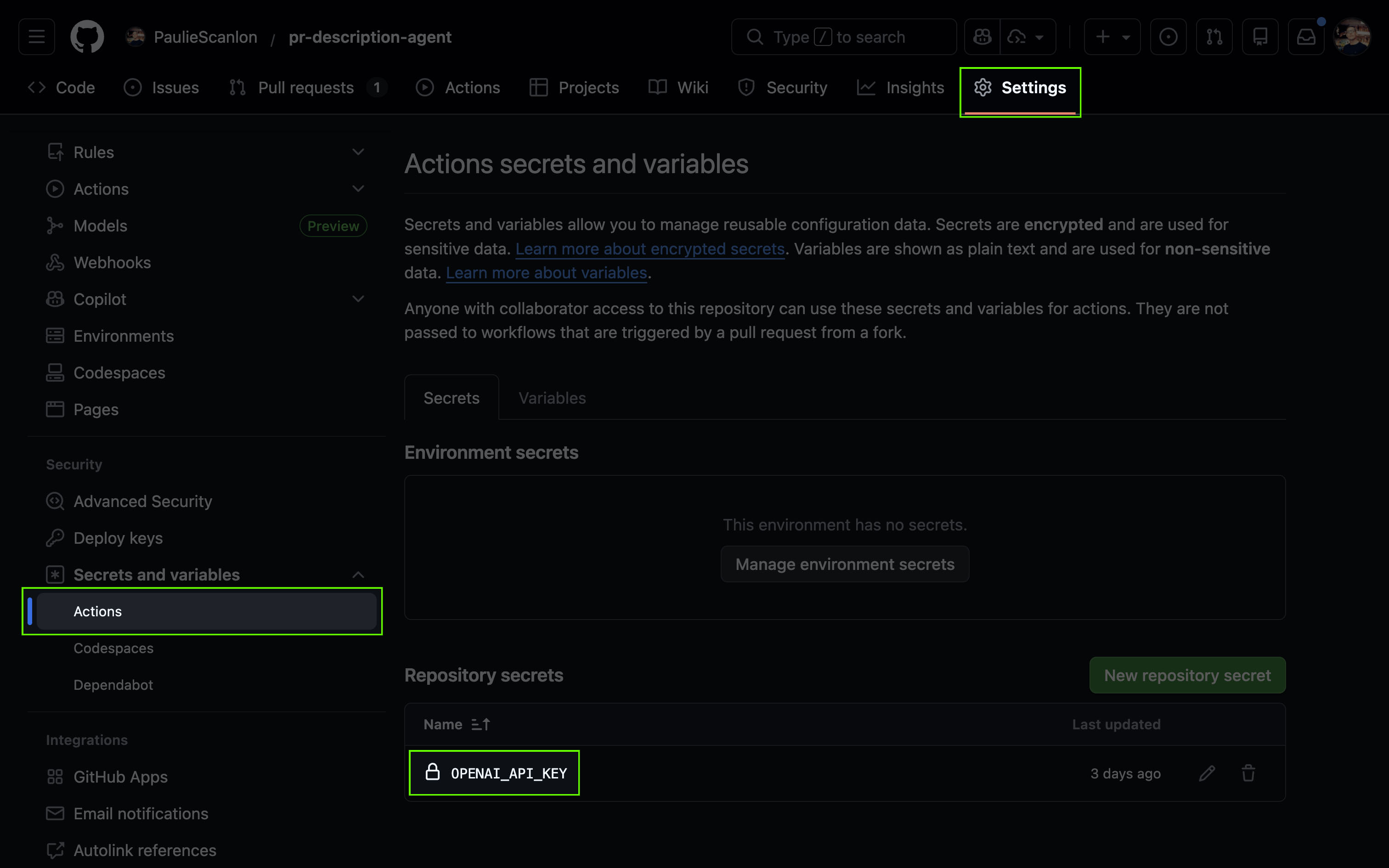
ワークフローはこの secret を ${{ secrets.OPENAI_API_KEY }} として参照し、実行時に Mastra Agent から利用できるようにします。
Description Agent の作成Description Agent の作成への直接リンク
PR description Agent は、git diff を明確で reviewer が理解しやすい pull request description に変換します。
この Agent は pull request の raw diff を受け取ります。設定された各言語で description を生成し、各言語のセクションを素早く確認できるよう、国旗の絵文字を使って出力を整形します。
import { Agent } from '@mastra/core/agent'

export const descriptionAgent = new Agent({
  id: 'description-agent',
  name: 'PR Description Agent',
  instructions: `You are a helpful assistant that creates clear, concise PR descriptions.

When given a git diff of changed files, you will:
1. Analyze the changes to understand what was modified
2. Write a brief summary and list of changes
3. Output the same content in English, Spanish, and Japanese

Guidelines:
- Be concise but informative
- Focus on the "what" and "why" of changes
- Use technical terms appropriately
- Keep bullet points short and scannable
- Each language section should contain the same information, naturally translated

Output format:

### 🇬🇧 English

[1-2 sentence summary]

- [Change 1]
- [Change 2]
- [Change 3]

---

### 🇪🇸 Español

[Same summary in Spanish]

- [Same changes in Spanish]

---

### 🇯🇵 日本語

[Same summary in Japanese]

- [Same changes in Japanese]
`,
  model: 'openai/gpt-5.6-sol',
})
Agent をローカルでテストするAgent をローカルでテストするへの直接リンク
ワークフローをデプロイする前に、Studio で Agent をテストし、description が正しく生成されることを確認できます。
-
公開されている任意の GitHub PR の URL 末尾に
.diffを追加して diff を取得します。https://github.com/owner/repo/pull/123.diff -
Studio で PR Description Agent を開き、次のプロンプトとともに diff の内容を貼り付けます。
「次の変更に対する PR description を作成してください。<paste the diff content here>」
Agent は、英語、スペイン語、日本語のセクションを含む、整形された description を返します。
GitHub ActionsGitHub Actionsへの直接リンク
GitHub Actions は、GitHub のインフラ上にある短時間だけ存続する環境でワークフローを実行します。実行ごとにクリーンな仮想マシンが起動し、コードが checkout されます。ワークフローの各ステップを実行する前に依存関係をインストールします。実行が完了すると環境は停止します。アーティファクトやキャッシュとして明示的に保存しない限り、実行間でデータは保持されません。
Workflow の作成Workflow の作成への直接リンク
GitHub Actions ワークフローは .github/workflows ディレクトリに配置します。プロジェクトルートに .github ディレクトリを作成し、その中に workflows ディレクトリを作成します。そこへ pr-description.yml を追加します。
このワークフローは、pull request が開かれたとき、または更新されたときに実行されます。PR の diff を生成し、変更内容を記述するよう Mastra Agent を呼び出し、GitHub UI の PR description に直接書き込みます。
name: PR Description Generator

on:
  pull_request:
    types: [opened, synchronize]

permissions:
  contents: read
  pull-requests: write

env:
  GH_TOKEN: ${{ secrets.GITHUB_TOKEN }}
  OPENAI_API_KEY: ${{ secrets.OPENAI_API_KEY }}
  PR_DIFF_FILE: /tmp/pr_diff.txt
  PR_DESCRIPTION_FILE: /tmp/pr_description.md

jobs:
  generate-description:
    runs-on: ubuntu-latest
    steps:
      - uses: actions/checkout@v4
        with:
          fetch-depth: 0

      - uses: actions/setup-node@v4
        with:
          node-version: '22'
          cache: 'npm'

      - run: npm ci

      - id: pr
        run: |
          BASE_REF=$(gh pr view ${{ github.event.pull_request.number }} --json baseRefName -q '.baseRefName')
          git fetch origin $BASE_REF
          git diff origin/$BASE_REF...HEAD -- . ':!package-lock.json' > $PR_DIFF_FILE

      - run: npx tsx .github/scripts/generate-description.ts

      - run: gh pr edit ${{ github.event.pull_request.number }} --body-file $PR_DESCRIPTION_FILE
Workflow の解説Workflow の解説への直接リンク
on: pull_request:pull request が開かれたとき、または更新されたときに実行されます。permissions: pull-requests: write:ワークフローに PR description を更新する権限を与えます。env:ステップ間で使用する共有ファイルパスを定義し、Mastra Agent が使用するモデル API キーなど、リポジトリ secret から必要な値を読み取ります。actions/checkout@v4+ git commands:リポジトリの全履歴を checkout し、PR の base ブランチを取得して、PR の diff を/tmp/pr_diff.txtに書き込みます。actions/setup-node@v4:ワークフローで使用する Node.js ランタイムをセットアップします。npm ci:lockfile に基づいてリポジトリの Node.js 依存関係をインストールします。generate-description.ts:/tmp/pr_diff.txtを読み取り、Mastra Agent を呼び出して、生成された description を/tmp/pr_description.mdに書き込みます。gh pr edit:/tmp/pr_description.mdの内容で pull request description を更新します。
このワークフローは diff の生成時に package-lock.json を除外します。lockfile はサイズが大きくノイズも多いことがあるため、含めると Agent のコンテキスト window を圧迫し、生成される description が理解しにくくなる可能性があります。
Workflow スクリプトの作成Workflow スクリプトの作成への直接リンク
scripts ディレクトリを .github 内に作成し、generate-description.ts を追加します。
このスクリプトは PR_DIFF_FILE から PR の diff を読み取り、Mastra Agent で description を生成して、ワークフローが pull request に公開できるよう PR_DESCRIPTION_FILE に結果を書き込みます。
import { readFileSync, writeFileSync } from 'fs'
import { mastra } from '../../src/mastra'

const agent = mastra.getAgent('descriptionAgent')

await agent.generate(
  `Please create a PR description for the following changes.

Git diff:
\`\`\`diff
${readFileSync(process.env.PR_DIFF_FILE!, 'utf-8')}
\`\`\``,
  {
    onError: () => {
      writeFileSync(
        process.env.PR_DESCRIPTION_FILE!,
        'This PR diff is too large to generate a description automatically.',
      )
    },
    onFinish: result => {
      writeFileSync(process.env.PR_DESCRIPTION_FILE!, result.text)
    },
  },
)
Workflow スクリプトの解説Workflow スクリプトの解説への直接リンク
mastra.getAgent("descriptionAgent"):PR description を生成する Mastra Agent を取得します。agent.generate(...):PR_DIFF_FILEから pull request の diff を読み取り、PR description を作成するよう Agent に依頼します。onErrorコールバック:diff が大きすぎて処理できない場合、fallback メッセージをPR_DESCRIPTION_FILEに書き込みます。onFinishコールバック:生成された PR description をPR_DESCRIPTION_FILEに書き込みます。
次のステップ次のステップへの直接リンク
これで、Mastra Agent を使って多言語の PR description を生成する GitHub Action が完成しました。ワークフローと関連ファイルを main ブランチに merge すると、次に pull request が作成または更新されたときに Agent が自動的に実行されます。実行状況はリポジトリの Actions タブで確認できます。
ここからは、Agent の instructions をカスタマイズしたり、出力言語を変更したりできます。また、ほかのイベントを処理するようワークフローを拡張することもできます。
関連情報:
- Agent のドキュメント
- Agent に追加のコンテキストを取得するための Tool を与える
- issue comment や release など、ほかの GitHub Actions triggerを確認する