控制流
Workflow 会运行一系列预定义任务,你可以控制该流程的执行方式。任务被划分为步骤,可根据需求以不同方式执行:可以依次或并行运行,也可以根据条件采用不同路径。
每个步骤通过定义的 Schema 连接到 Workflow 中的下一步骤,使数据保持受控和一致。
核心原则核心原则的直接链接
- 第一个步骤的
inputSchema必须与 Workflow 的inputSchema匹配。 - 最后一个步骤的
outputSchema必须与 Workflow 的outputSchema匹配。 - 每个步骤的
outputSchema必须与下一步骤的inputSchema匹配。- 如果不匹配,请使用输入数据映射将数据转换为所需结构。
使用 .then() 链接步骤chaining-steps-with-then的直接链接
使用 .then() 按顺序运行步骤,让每个步骤都能访问上一步的结果。

const step1 = createStep({
  inputSchema: z.object({
    message: z.string(),
  }),
  outputSchema: z.object({
    formatted: z.string(),
  }),
})

const step2 = createStep({
  inputSchema: z.object({
    formatted: z.string(),
  }),
  outputSchema: z.object({
    emphasized: z.string(),
  }),
})

export const testWorkflow = createWorkflow({
  inputSchema: z.object({
    message: z.string(),
  }),
  outputSchema: z.object({
    emphasized: z.string(),
  }),
})
  .then(step1)
  .then(step2)
  .commit()
使用 .parallel() 同时运行步骤simultaneous-steps-with-parallel的直接链接
使用 .parallel() 同时运行多个步骤。所有并行步骤都必须完成,Workflow 才会继续执行下一步骤。定义后续步骤的 inputSchema 时会使用每个步骤的 id;该 ID 也会成为 inputData 对象上的键,用于访问先前步骤的值。后续步骤可以引用或合并并行步骤的输出。

const step1 = createStep({
  id: 'step-1',
})

const step2 = createStep({
  id: 'step-2',
})

const step3 = createStep({
  id: 'step-3',
  inputSchema: z.object({
    'step-1': z.object({
      formatted: z.string(),
    }),
    'step-2': z.object({
      emphasized: z.string(),
    }),
  }),
  outputSchema: z.object({
    combined: z.string(),
  }),
  execute: async ({ inputData }) => {
    const { formatted } = inputData['step-1']
    const { emphasized } = inputData['step-2']
    return {
      combined: `${formatted} | ${emphasized}`,
    }
  },
})

export const testWorkflow = createWorkflow({
  inputSchema: z.object({
    message: z.string(),
  }),
  outputSchema: z.object({
    combined: z.string(),
  }),
})
  .parallel([step1, step2])
  .then(step3)
  .commit()
输出结构输出结构的直接链接
多个步骤并行运行时,输出是一个对象,每个键是步骤的 id,值是该步骤的输出。可以独立访问每个并行步骤的结果。
const step1 = createStep({
  id: 'format-step',
  inputSchema: z.object({ message: z.string() }),
  outputSchema: z.object({ formatted: z.string() }),
  execute: async ({ inputData }) => ({
    formatted: inputData.message.toUpperCase(),
  }),
})

const step2 = createStep({
  id: 'count-step',
  inputSchema: z.object({ message: z.string() }),
  outputSchema: z.object({ count: z.number() }),
  execute: async ({ inputData }) => ({
    count: inputData.message.length,
  }),
})

const step3 = createStep({
  id: 'combine-step',
  // The inputSchema must match the structure of parallel outputs
  inputSchema: z.object({
    'format-step': z.object({ formatted: z.string() }),
    'count-step': z.object({ count: z.number() }),
  }),
  outputSchema: z.object({ result: z.string() }),
  execute: async ({ inputData }) => {
    // Access each parallel step's output by its id
    const formatted = inputData['format-step'].formatted
    const count = inputData['count-step'].count
    return {
      result: `${formatted} (${count} characters)`,
    }
  },
})

export const testWorkflow = createWorkflow({
  id: 'parallel-output-example',
  inputSchema: z.object({ message: z.string() }),
  outputSchema: z.object({ result: z.string() }),
})
  .parallel([step1, step2])
  .then(step3)
  .commit()

// When executed with { message: "hello" }
// The parallel output structure will be:
// {
//   "format-step": { formatted: "HELLO" },
//   "count-step": { count: 5 }
// }
要点:
- 每个并行步骤的输出都以其
id为键 - 所有并行步骤同时执行
- 下一步骤接收包含所有并行步骤输出的对象
- 必须定义后续步骤的
inputSchema,使其与该结构匹配
处理步骤失败处理步骤失败的直接链接
如果任意并行步骤抛出错误,整个并行区块都会失败。若要构建部分步骤可能失败的弹性并行 Workflow(例如多个研究 Agent 中有一个身份验证 token 过期),请在步骤内部使用 try/catch 处理错误:
const resilientStep = createStep({
  id: 'researcher',
  inputSchema: z.object({ query: z.string() }),
  outputSchema: z.object({
    brief: z.string().nullable(),
    failed: z.boolean(),
  }),
  execute: async ({ inputData }) => {
    try {
      const result = await fetchExternalData(inputData.query)
      return { brief: result, failed: false }
    } catch {
      return { brief: null, failed: true }
    }
  },
})
这样步骤始终会以类型化结果成功完成,下游步骤可以筛除失败的结果:
const writerStep = createStep({
  id: 'writer',
  inputSchema: z.object({
    'researcher-a': z.object({ brief: z.string().nullable(), failed: z.boolean() }),
    'researcher-b': z.object({ brief: z.string().nullable(), failed: z.boolean() }),
  }),
  outputSchema: z.object({ synthesis: z.string() }),
  execute: async ({ inputData }) => {
    const briefs = Object.values(inputData)
      .filter(v => !v.failed && v.brief)
      .map(v => v.brief)
    return { synthesis: briefs.join('; ') }
  },
})
有关何时使用 .parallel() 或 .foreach(),请参阅选择正确模式。
使用 .branch() 实现条件逻辑conditional-logic-with-branch的直接链接
使用 .branch() 根据条件选择要运行的步骤。分支中的所有步骤都需要相同的 inputSchema 和 outputSchema,因为分支需要一致的 Schema,Workflow 才能采用不同路径。
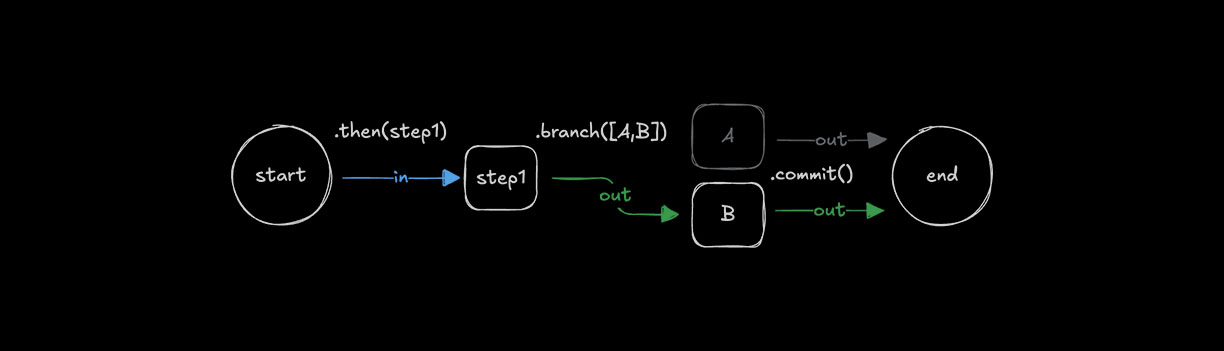
const step1 = createStep({...})

const stepA = createStep({
  inputSchema: z.object({
    value: z.number()
  }),
  outputSchema: z.object({
    result: z.string()
  })
});

const stepB = createStep({
  inputSchema: z.object({
    value: z.number()
  }),
  outputSchema: z.object({
    result: z.string()
  })
});

export const testWorkflow = createWorkflow({
  inputSchema: z.object({
    value: z.number()
  }),
  outputSchema: z.object({
    result: z.string()
  })
})
  .then(step1)
  .branch([
    [async ({ inputData: { value } }) => value > 10, stepA],
    [async ({ inputData: { value } }) => value <= 10, stepB]
  ])
  .commit();
输出结构输出结构的直接链接
使用条件分支时,只会执行条件最先求值为 true 的一个分支。输出结构与 .parallel() 类似,结果以已执行步骤的 id 为键。
const step1 = createStep({
  id: 'initial-step',
  inputSchema: z.object({ value: z.number() }),
  outputSchema: z.object({ value: z.number() }),
  execute: async ({ inputData }) => inputData,
})

const highValueStep = createStep({
  id: 'high-value-step',
  inputSchema: z.object({ value: z.number() }),
  outputSchema: z.object({ result: z.string() }),
  execute: async ({ inputData }) => ({
    result: `High value: ${inputData.value}`,
  }),
})

const lowValueStep = createStep({
  id: 'low-value-step',
  inputSchema: z.object({ value: z.number() }),
  outputSchema: z.object({ result: z.string() }),
  execute: async ({ inputData }) => ({
    result: `Low value: ${inputData.value}`,
  }),
})

const finalStep = createStep({
  id: 'final-step',
  // The inputSchema must account for either branch's output
  inputSchema: z.object({
    'high-value-step': z.object({ result: z.string() }).optional(),
    'low-value-step': z.object({ result: z.string() }).optional(),
  }),
  outputSchema: z.object({ message: z.string() }),
  execute: async ({ inputData }) => {
    // Only one branch will have executed
    const result = inputData['high-value-step']?.result || inputData['low-value-step']?.result
    return { message: result }
  },
})

export const testWorkflow = createWorkflow({
  id: 'branch-output-example',
  inputSchema: z.object({ value: z.number() }),
  outputSchema: z.object({ message: z.string() }),
})
  .then(step1)
  .branch([
    [async ({ inputData }) => inputData.value > 10, highValueStep],
    [async ({ inputData }) => inputData.value <= 10, lowValueStep],
  ])
  .then(finalStep)
  .commit()

// When executed with { value: 15 }
// Only the high-value-step executes, output structure:
// {
//   "high-value-step": { result: "High value: 15" }
// }

// When executed with { value: 5 }
// Only the low-value-step executes, output structure:
// {
//   "low-value-step": { result: "Low value: 5" }
// }
要点:
- 根据条件求值顺序只执行一个分支
- 输出以已执行步骤的
id为键 - 后续步骤应处理所有可能的分支输出
- 下一步骤需要处理多个可能分支时,请在
inputSchema中使用可选字段 - 条件按定义顺序求值
输入数据映射输入数据映射的直接链接
使用 .then()、.parallel() 或 .branch() 时,有时需要转换上一步的输出,使其与下一步骤的输入匹配。这时可以使用 .map() 访问 inputData 并进行转换,为下一步骤创建合适的数据结构。

const step1 = createStep({...});
const step2 = createStep({...});

export const testWorkflow = createWorkflow({...})
  .then(step1)
  .map(async ({ inputData }) => {
    const { foo } = inputData;
    return {
      bar: `new ${foo}`,
    };
  })
  .then(step2)
  .commit();
.map() 方法还提供用于复杂映射场景的辅助函数。
可用辅助函数:
getStepResult():访问特定步骤的完整输出getInitData<any>():访问 Workflow 的初始输入数据mapVariable():使用声明式对象语法提取和重命名字段
Parallel 和 Branch 输出Parallel 和 Branch 输出的直接链接
处理 .parallel() 或 .branch() 输出时,可以使用 .map() 转换数据结构,然后再传给下一步骤。需要扁平化或重构输出时尤其有用。
export const testWorkflow = createWorkflow({...})
  .parallel([step1, step2])
  .map(async ({ inputData }) => {
    // Transform the parallel output structure
    return {
      combined: `${inputData["step1"].value} - ${inputData["step2"].value}`
    };
  })
  .then(nextStep)
  .commit();
也可以使用 .map() 提供的辅助函数:
export const testWorkflow = createWorkflow({...})
  .branch([
    [condition1, stepA],
    [condition2, stepB]
  ])
  .map(async ({ inputData, getStepResult }) => {
    // Access specific step results
    const stepAResult = getStepResult("stepA");
    const stepBResult = getStepResult("stepB");

    // Return the result from whichever branch executed
    return stepAResult || stepBResult;
  })
  .then(nextStep)
  .commit();
循环步骤循环步骤的直接链接
Workflow 支持多种循环方法,可以重复步骤直到或只要条件满足,也可以迭代数组。循环可以与 .then() 等其他控制方法组合。
使用 .dountil() 循环looping-with-dountil的直接链接
使用 .dountil() 重复运行步骤,直到条件变为 true。
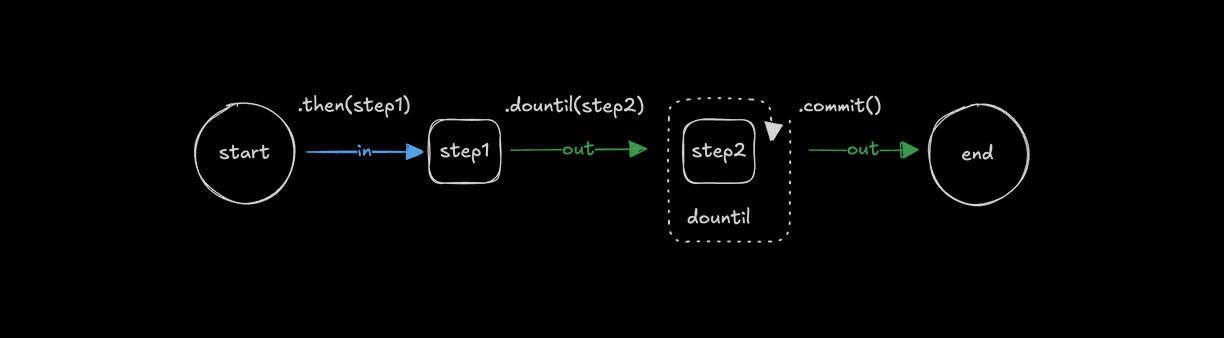
const step1 = createStep({...});

const step2 = createStep({
  execute: async ({ inputData }) => {
    const { number } = inputData;
    return {
      number: number + 1
    };
  }
});

export const testWorkflow = createWorkflow({})
  .then(step1)
  .dountil(step2, async ({ inputData: { number } }) => number > 10)
  .commit();
使用 .dowhile() 循环looping-with-dowhile的直接链接
使用 .dowhile() 在条件保持为 true 时重复运行步骤。
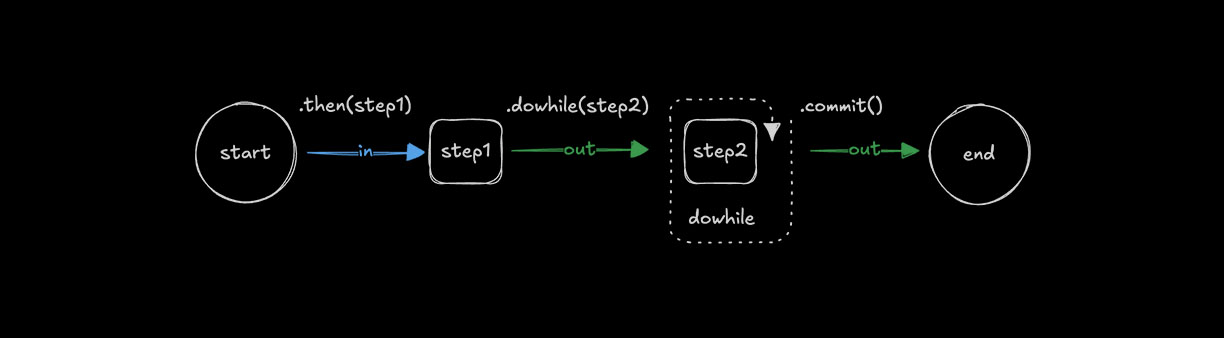
const step1 = createStep({...});

const step2 = createStep({
  execute: async ({ inputData }) => {
    const { number } = inputData;
    return {
      number: number + 1
    };
  }
});

export const testWorkflow = createWorkflow({})
  .then(step1)
  .dowhile(step2, async ({ inputData: { number } }) => number < 10)
  .commit();
使用 .foreach() 循环looping-with-foreach的直接链接
使用 .foreach() 为数组中的每个条目运行相同步骤。输入必须为 array 类型,循环才能迭代其中的值并对每个值应用步骤逻辑。何时使用 .foreach() 或其他方法,请参阅选择正确模式。
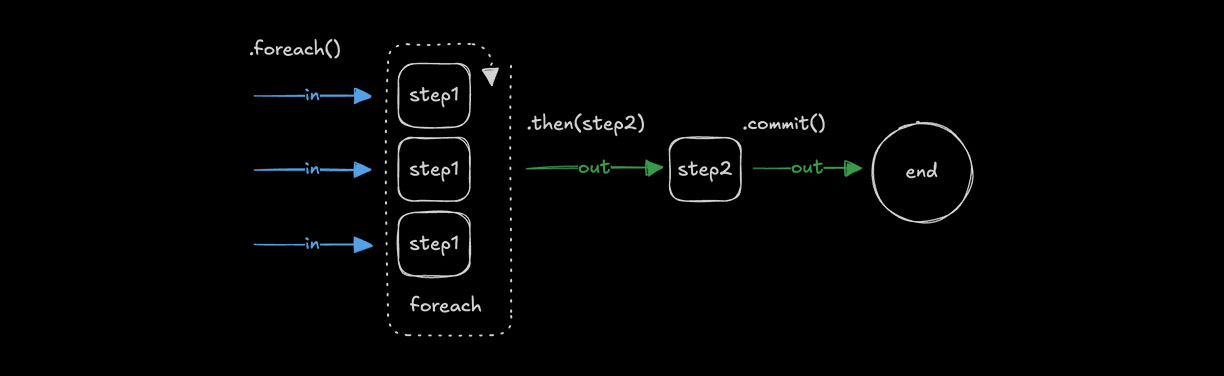
const step1 = createStep({
  inputSchema: z.string(),
  outputSchema: z.string(),
  execute: async ({ inputData }) => {
    return inputData.toUpperCase();
  }
});

const step2 = createStep({...});

export const testWorkflow = createWorkflow({
  inputSchema: z.array(z.string()),
  outputSchema: z.array(z.string())
})
  .foreach(step1)
  .then(step2)
  .commit();
输出结构输出结构的直接链接
.foreach() 方法始终返回包含每次迭代输出的数组,输出顺序与输入顺序一致。
const addTenStep = createStep({
  id: 'add-ten',
  inputSchema: z.object({ value: z.number() }),
  outputSchema: z.object({ value: z.number() }),
  execute: async ({ inputData }) => ({
    value: inputData.value + 10,
  }),
})

export const testWorkflow = createWorkflow({
  id: 'foreach-output-example',
  inputSchema: z.array(z.object({ value: z.number() })),
  outputSchema: z.array(z.object({ value: z.number() })),
})
  .foreach(addTenStep)
  .commit()

// When executed with [{ value: 1 }, { value: 22 }, { value: 333 }]
// Output: [{ value: 11 }, { value: 32 }, { value: 343 }]
并发限制并发限制的直接链接
使用 concurrency 控制处理的数组条目数。默认值为 1,即依次运行步骤。增大该值可让 .foreach() 同时处理多个条目。
const step1 = createStep({...})

export const testWorkflow = createWorkflow({...})
  .foreach(step1, { concurrency: 4 })
  .commit();
在 .foreach() 后聚合结果aggregating-results-after-foreach的直接链接
由于 .foreach() 输出数组,可以使用 .then() 或 .map() 聚合或转换结果。.foreach() 后的步骤会接收完整数组作为输入。
const processItemStep = createStep({
  id: 'process-item',
  inputSchema: z.object({ value: z.number() }),
  outputSchema: z.object({ processed: z.number() }),
  execute: async ({ inputData }) => ({
    processed: inputData.value * 2,
  }),
})

const aggregateStep = createStep({
  id: 'aggregate',
  // Input is an array of outputs from foreach
  inputSchema: z.array(z.object({ processed: z.number() })),
  outputSchema: z.object({ total: z.number() }),
  execute: async ({ inputData }) => ({
    // Sum all processed values
    total: inputData.reduce((sum, item) => sum + item.processed, 0),
  }),
})

export const testWorkflow = createWorkflow({
  id: 'foreach-aggregate-example',
  inputSchema: z.array(z.object({ value: z.number() })),
  outputSchema: z.object({ total: z.number() }),
})
  .foreach(processItemStep)
  .then(aggregateStep) // Receives the full array from foreach
  .commit()

// When executed with [{ value: 1 }, { value: 2 }, { value: 3 }]
// After foreach: [{ processed: 2 }, { processed: 4 }, { processed: 6 }]
// After aggregate: { total: 12 }
也可以使用 .map() 转换数组输出:
export const testWorkflow = createWorkflow({...})
  .foreach(processItemStep)
  .map(async ({ inputData }) => ({
    // Transform the array into a different structure
    values: inputData.map(item => item.processed),
    count: inputData.length
  }))
  .then(nextStep)
  .commit();
链接多个 .foreach() 调用chaining-multiple-foreach-calls的直接链接
链接多个 .foreach() 调用时,每个调用都作用于上一步的数组输出。这适合数组中的每个条目都需要依次经过多个步骤转换的情况。
const chunkStep = createStep({
  id: 'chunk',
  // Takes a document, returns an array of chunks
  inputSchema: z.object({ content: z.string() }),
  outputSchema: z.array(z.object({ chunk: z.string() })),
  execute: async ({ inputData }) => {
    // Split document into chunks
    const chunks = inputData.content.match(/.{1,100}/g) || []
    return chunks.map(chunk => ({ chunk }))
  },
})

const embedStep = createStep({
  id: 'embed',
  // Takes a single chunk, returns embedding
  inputSchema: z.object({ chunk: z.string() }),
  outputSchema: z.object({ embedding: z.array(z.number()) }),
  execute: async ({ inputData }) => ({
    embedding: [/* vector embedding */],
  }),
})

// For a single document that produces multiple chunks:
export const singleDocWorkflow = createWorkflow({
  id: 'single-doc-rag',
  inputSchema: z.object({ content: z.string() }),
  outputSchema: z.array(z.object({ embedding: z.array(z.number()) })),
})
  .then(chunkStep) // Returns array of chunks
  .foreach(embedStep) // Process each chunk -> array of embeddings
  .commit()
对于每个文档都会产生多个 chunk 的多文档处理,有以下选择:
选项 1:在单个步骤中处理所有文档并控制批处理
const downloadAndChunkStep = createStep({
  id: "download-and-chunk",
  inputSchema: z.array(z.string()),  // Array of URLs
  outputSchema: z.array(z.object({ chunk: z.string(), source: z.string() })),
  execute: async ({ inputData: urls }) => {
    // Control batching/parallelization within the step
    const allChunks = [];
    for (const url of urls) {
      const content = await fetch(url).then(r => r.text());
      const chunks = content.match(/.{1,100}/g) || [];
      allChunks.push(...chunks.map(chunk => ({ chunk, source: url })));
    }
    return allChunks;
  }
});

export const multiDocWorkflow = createWorkflow({...})
  .then(downloadAndChunkStep)  // Returns flat array of all chunks
  .foreach(embedStep, { concurrency: 10 })  // Embed each chunk in parallel
  .commit();
选项 2:对文档使用 foreach 并聚合 chunk,再使用 foreach 生成嵌入
const downloadStep = createStep({
  id: 'download',
  inputSchema: z.string(), // Single URL
  outputSchema: z.object({ content: z.string(), source: z.string() }),
  execute: async ({ inputData: url }) => ({
    content: await fetch(url).then(r => r.text()),
    source: url,
  }),
})

const chunkDocStep = createStep({
  id: 'chunk-doc',
  inputSchema: z.object({ content: z.string(), source: z.string() }),
  outputSchema: z.array(z.object({ chunk: z.string(), source: z.string() })),
  execute: async ({ inputData }) => {
    const chunks = inputData.content.match(/.{1,100}/g) || []
    return chunks.map(chunk => ({ chunk, source: inputData.source }))
  },
})

export const multiDocWorkflow = createWorkflow({
  id: 'multi-doc-rag',
  inputSchema: z.array(z.string()), // Array of URLs
  outputSchema: z.array(z.object({ embedding: z.array(z.number()) })),
})
  .foreach(downloadStep, { concurrency: 5 }) // Download docs in parallel
  .foreach(chunkDocStep) // Chunk each doc -> array of chunk arrays
  .map(async ({ inputData }) => {
    // Flatten nested arrays: [[chunks], [chunks]] -> [chunks]
    return inputData.flat()
  })
  .foreach(embedStep, { concurrency: 10 }) // Embed all chunks
  .commit()
链接 .foreach() 的要点:
- 每个
.foreach()都作用于上一步的数组 - 如果
.foreach()内的步骤返回数组,输出将成为数组的数组 - 必要时使用带
.flat()的.map()扁平化嵌套数组 - 对于复杂 RAG 管道,选项 1(在单个步骤中处理批次)通常能提供更好的控制
foreach 内的嵌套 Workflowforeach 内的嵌套 Workflow的直接链接
.foreach() 后的步骤只会在所有迭代完成后执行。如果每个条目都需要运行多个连续操作,请使用嵌套 Workflow,而不是链接多个 .foreach() 调用。这样可以将一个条目的所有操作放在一起,让数据流更清晰。
// Define a workflow that processes a single document
const processDocumentWorkflow = createWorkflow({
  id: 'process-document',
  inputSchema: z.object({ url: z.string() }),
  outputSchema: z.object({
    embeddings: z.array(z.array(z.number())),
    metadata: z.object({ url: z.string(), chunkCount: z.number() }),
  }),
})
  .then(downloadStep) // Download the document
  .then(chunkStep) // Split into chunks
  .then(embedChunksStep) // Embed all chunks for this document
  .then(formatResultStep) // Format the final output
  .commit()

// Use the nested workflow inside foreach
export const batchProcessWorkflow = createWorkflow({
  id: 'batch-process-documents',
  inputSchema: z.array(z.object({ url: z.string() })),
  outputSchema: z.array(
    z.object({
      embeddings: z.array(z.array(z.number())),
      metadata: z.object({ url: z.string(), chunkCount: z.number() }),
    }),
  ),
})
  .foreach(processDocumentWorkflow, { concurrency: 3 })
  .commit()

// Each document goes through all 4 steps before the next document starts (with concurrency: 1)
// With concurrency: 3, up to 3 documents process their full pipelines in parallel
使用嵌套 Workflow 的原因:
- 并行性更好:使用
concurrency: N时,多个条目可以同时运行完整管道。链接.foreach().foreach()会等待所有条目完成步骤 1,再让所有条目进入步骤 2;嵌套 Workflow 则让每个条目独立推进 - 收集结果前,一个条目的所有步骤会一起完成
- 比创建嵌套数组的多个
.foreach()调用更简洁 - 每次嵌套 Workflow 执行相互独立,并有自己的数据流
- 更容易单独测试和复用每个条目的逻辑
工作方式:
- 父 Workflow 将每个数组条目传给一个嵌套 Workflow 实例
- 每个嵌套 Workflow 为该条目运行完整步骤序列
- 使用
concurrency > 1时,多个嵌套 Workflow 并行执行 - 嵌套 Workflow 的最终输出成为结果数组中的一个元素
- 所有嵌套 Workflow 完成后,父级的下一步骤接收完整数组
选择正确模式选择正确模式的直接链接
本节可作为选择适当控制流方法的参考。
快速参考快速参考的直接链接
| 方法 | 用途 | 输入 | 输出 | 并发 |
|---|---|---|---|---|
.then(step) | 顺序处理 | T | U | 不适用(一次一个) |
.parallel([a, b]) | 对同一输入执行不同操作 | T | { a: U, b: V } | 全部同时运行 |
.foreach(step) | 对每个数组条目执行相同操作 | T[] | U[] | 可配置(默认 1) |
.branch([...]) | 选择条件路径 | T | { selectedStep: U } | 只运行一个分支 |
.parallel() 与 .foreach()parallel-vs-foreach的直接链接
当一个输入需要经过不同处理时,请使用 .parallel():
// Same user data processed differently in parallel
workflow.parallel([validateStep, enrichStep, scoreStep]).then(combineResultsStep)
当多个输入需要经过相同处理时,请使用 .foreach():
// Multiple URLs each processed the same way
workflow.foreach(downloadStep, { concurrency: 5 }).then(aggregateStep)
何时使用嵌套 Workflow何时使用嵌套 Workflow的直接链接
在 .foreach() 内——当每个数组条目都需要多个连续步骤时:
// Each document goes through a full pipeline
const processDocWorkflow = createWorkflow({...})
  .then(downloadStep)
  .then(parseStep)
  .then(embedStep)
  .commit();

workflow.foreach(processDocWorkflow, { concurrency: 3 })
单个 .foreach() 会使结果保持扁平;链接 .foreach().foreach() 会创建嵌套数组。
在 .parallel() 内——当一个并行分支需要自己的多步管道时:
const pipelineA = createWorkflow({...}).then(step1).then(step2).commit();
const pipelineB = createWorkflow({...}).then(step3).then(step4).commit();

workflow.parallel([pipelineA, pipelineB])
链接模式链接模式的直接链接
| 模式 | 发生的行为 | 常见使用场景 |
|---|---|---|
.then().then() | 顺序步骤 | 简单管道 |
.parallel().then() | 并行运行,然后合并 | 扇出/扇入 |
.foreach().then() | 处理所有条目,然后聚合 | Map-reduce |
.foreach().foreach() | 创建数组的数组 | 避免使用——改用嵌套 Workflow 或带 .flat() 的 .map() |
.foreach(workflow) | 每个条目运行完整管道 | 每个数组条目的多步处理 |
同步:下一步骤何时运行?同步:下一步骤何时运行?的直接链接
.parallel() 和 .foreach() 都是同步点。只有所有并行分支或所有数组迭代完成后,Workflow 中的下一步骤才会执行。
workflow
  .parallel([stepA, stepB, stepC]) // All 3 run simultaneously
  .then(combineStep) // Waits for ALL 3 to finish before running
  .commit()

workflow
  .foreach(processStep, { concurrency: 5 }) // Up to 5 items process at once
  .then(aggregateStep) // Waits for ALL items to finish before running
  .commit()
这意味着:
.parallel()将所有分支输出收集到对象,再传给下一步骤.foreach()将所有迭代输出收集到数组,再传给下一步骤- 结果完成时无法逐个“以 Stream 形式”传给下一步骤
并发行为并发行为的直接链接
| 方法 | 行为 |
|---|---|
.then() | 顺序执行——一次一个步骤 |
.parallel() | 所有分支同时运行(没有限制选项) |
.foreach() | 通过 { concurrency: N } 控制——默认值为 1(顺序执行) |
.foreach() 中的嵌套 Workflow | 遵循父级的并发设置 |
**性能提示:**对于 .foreach() 中受 I/O 限制的操作,请提高并发数以并行处理条目:
// Process up to 10 items simultaneously
workflow.foreach(fetchDataStep, { concurrency: 10 })
循环管理循环管理的直接链接
可以根据希望循环如何结束,以不同方式实现循环条件。
常见模式会检查 inputData 中返回的值并设置最大迭代次数,也可以在达到限制时中止执行。
中止循环中止循环的直接链接
使用 iterationCount 限制循环运行次数。如果计数超过阈值,请抛出错误使步骤失败并停止 Workflow。
const step1 = createStep({...});

export const testWorkflow = createWorkflow({...})
  .dountil(step1, async ({ inputData: { userResponse, iterationCount } }) => {
    if (iterationCount >= 10) {
      throw new Error("Maximum iterations reached");
    }
    return userResponse === "yes";
  })
  .commit();