Semantic Recall
如果你问朋友上周末做了什么,他们会在记忆中搜索与“上周末”相关的事件,然后告诉你。这与 Mastra 中 Semantic Recall 的工作方式有些类似。
观看 Mastra Semantic Recall,了解 Agent 如何从过去的对话中检索相关消息。
Semantic Recall 的工作原理Semantic Recall 的工作原理的直接链接
Semantic Recall 是一种基于 RAG 的搜索。当消息不再位于近期消息历史中时,它可以帮助 Agent 在较长的交互中保持上下文。
它使用消息的向量嵌入进行相似度搜索,与 Vector Store 集成,并可配置每条检索消息周围的上下文窗口。
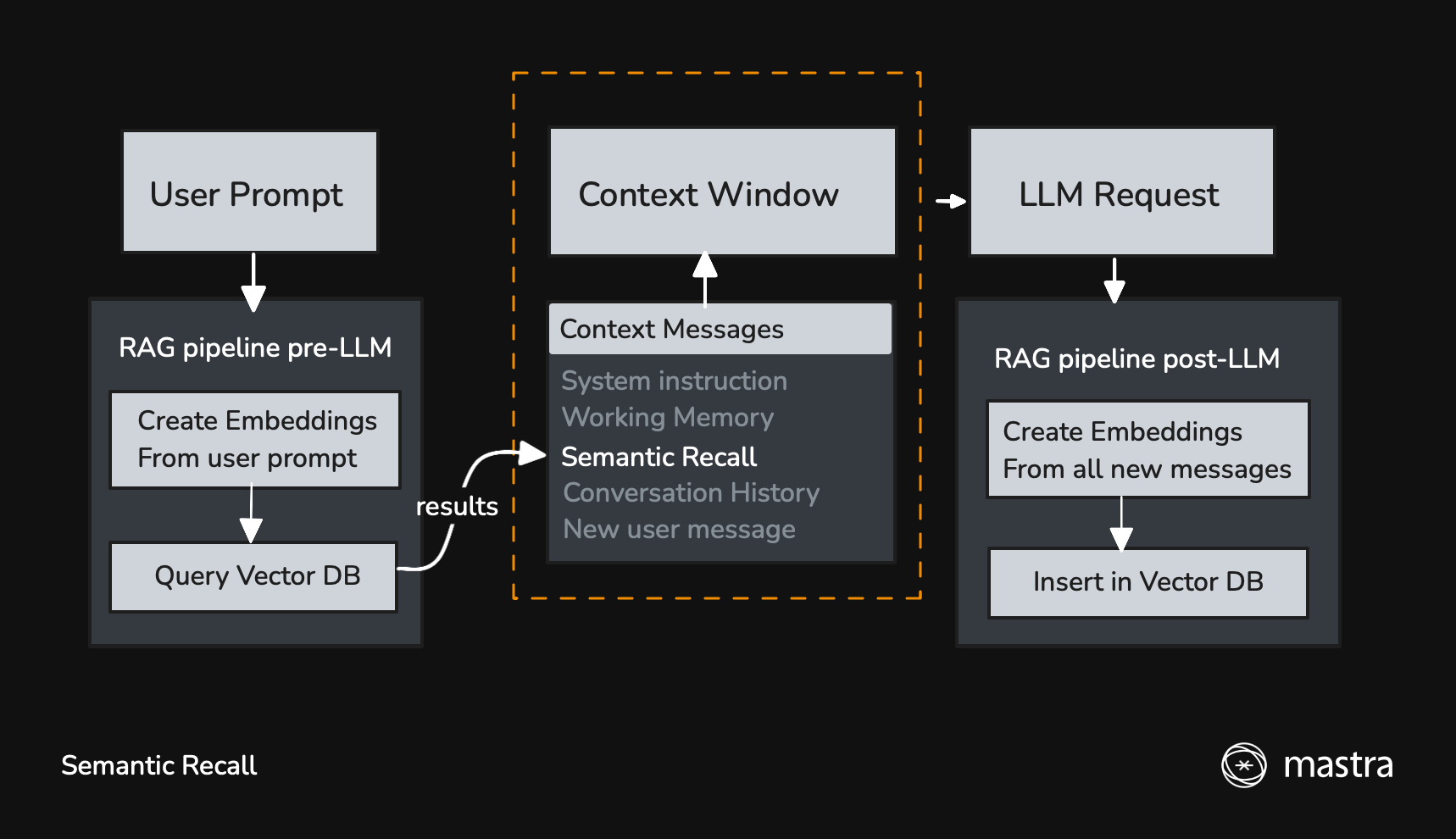
启用后,新消息会用于查询向量数据库,以查找语义相似的消息。
从 LLM 获得响应后,所有新消息(用户消息、助手消息以及 Tool 调用/结果)都会插入向量数据库,以便在后续交互中召回。
快速开始快速开始的直接链接
Semantic Recall 默认禁用。要启用它,请在 options 中设置 semanticRecall: true,并提供 vector Store 和 embedder:
- LibSQL
- MongoDB
import { Agent } from '@mastra/core/agent'
import { Memory } from '@mastra/memory'
import { LibSQLStore, LibSQLVector } from '@mastra/libsql'
import { ModelRouterEmbeddingModel } from '@mastra/core/llm'

const agent = new Agent({
  id: 'support-agent',
  name: 'SupportAgent',
  instructions: 'You are a helpful support agent.',
  model: 'openai/gpt-5.6-sol',
  memory: new Memory({
    storage: new LibSQLStore({
      id: 'agent-storage',
      url: 'file:./local.db',
    }),
    vector: new LibSQLVector({
      id: 'agent-vector',
      url: 'file:./local.db',
    }),
    embedder: new ModelRouterEmbeddingModel('openai/text-embedding-3-small'),
    options: {
      semanticRecall: true,
    },
  }),
})
import { Agent } from '@mastra/core/agent'
import { Memory } from '@mastra/memory'
import { MongoDBStore, MongoDBVector } from '@mastra/mongodb'
import { ModelRouterEmbeddingModel } from '@mastra/core/llm'

const agent = new Agent({
  id: 'support-agent',
  name: 'SupportAgent',
  instructions: 'You are a helpful support agent.',
  model: 'openai/gpt-5.6-sol',
  memory: new Memory({
    storage: new MongoDBStore({
      id: 'agent-storage',
      uri: process.env.MONGODB_URI,
      dbName: process.env.MONGODB_DB_NAME,
    }),
    vector: new MongoDBVector({
      id: 'agent-vector',
      uri: process.env.MONGODB_URI,
      dbName: process.env.MONGODB_DB_NAME,
    }),
    embedder: new ModelRouterEmbeddingModel('openai/text-embedding-3-small'),
    options: {
      semanticRecall: true,
    },
  }),
})
使用 recall() 方法using-the-recall-method的直接链接
listMessages 通过 Thread ID 和基本分页检索消息,而 recall() 还支持语义搜索。需要按含义而非时间远近查找消息时,请将 recall() 与 vectorSearchString 一起使用:
const memory = await agent.getMemory()

// Basic recall - similar to listMessages
const { messages } = await memory!.recall({
  threadId: 'thread-123',
  perPage: 50,
})

// Semantic recall - find messages by meaning
const { messages: relevantMessages } = await memory!.recall({
  threadId: 'thread-123',
  vectorSearchString: 'What did we discuss about the project deadline?',
  threadConfig: {
    semanticRecall: true,
  },
})
Storage 配置Storage 配置的直接链接
Semantic Recall 依赖 Storage 和向量数据库来存储消息及其嵌入。
import { Memory } from '@mastra/memory'
import { Agent } from '@mastra/core/agent'
import { LibSQLStore, LibSQLVector } from '@mastra/libsql'

const agent = new Agent({
  memory: new Memory({
    // this is the default storage db if omitted
    storage: new LibSQLStore({
      id: 'agent-storage',
      url: 'file:./local.db',
    }),
    // this is the default vector db if omitted
    vector: new LibSQLVector({
      id: 'agent-vector',
      url: 'file:./local.db',
    }),
    options: {
      semanticRecall: true,
    },
  }),
})
以下每个 Vector Store 页面都包含安装说明、配置参数和使用示例:
- Astra
- Chroma
- Cloudflare Vectorize
- Convex
- Couchbase
- DuckDB
- Elasticsearch
- LanceDB
- libSQL
- MongoDB
- OpenSearch
- OracleDB
- Pinecone
- PostgreSQL
- Qdrant
- S3 Vectors
- Turbopuffer
- Upstash
召回配置召回配置的直接链接
以下选项控制 Semantic Recall 的行为:
- topK:要检索的相似消息数量
- messageRange:每个匹配项周围需要包含的消息
- scope:搜索当前 Thread,还是某个 Resource 的所有 Thread
- filter:限制搜索结果的元数据条件
const agent = new Agent({
  id: 'agent',
  memory: new Memory({
    options: {
      semanticRecall: {
        topK: 3, // Retrieve 3 similar messages
        messageRange: 2, // Include 2 messages before and after each match
        scope: 'resource', // Search all threads for this resource
        filter: { projectId: { $eq: 'project-a' } },
      },
    },
  }),
})
LibSQL、OracleDB、PostgreSQL、MongoDB 和 Upstash Storage Adapter 支持 scope: 'resource'。
元数据筛选元数据筛选的直接链接
filter 选项会将 Semantic Recall 结果限制为 Thread 元数据匹配的消息。
const agent = new Agent({
  id: 'agent',
  memory: new Memory({
    options: {
      semanticRecall: {
        scope: 'resource',
        filter: {
          projectId: { $eq: 'project-a' },
          category: { $in: ['work', 'personal'] },
        },
      },
    },
  }),
})
筛选器会匹配消息保存时写入消息嵌入的元数据。如果 Thread 元数据随后发生变化,现有嵌入会继续保留先前的元数据,直到这些消息再次保存或建立索引。
支持的筛选运算符:
$and:逻辑 AND$eq:等于$gt:大于$gte:大于或等于$in:位于数组中$lt:小于$lte:小于或等于$ne:不等于$nin:不在数组中$or:逻辑 OR
以下示例展示常见用例的元数据筛选器:
// Filter by project
const options = {
  semanticRecall: { filter: { projectId: { $eq: 'my-project' } } },
}

// Filter by multiple categories
const options = {
  semanticRecall: { filter: { category: { $in: ['work', 'research'] } } },
}

// Filter by project and priority
const options = {
  semanticRecall: {
    filter: {
      $and: [{ projectId: { $eq: 'project-a' } }, { priority: { $gte: 3 } }],
    },
  },
}
Embedder 配置Embedder 配置的直接链接
Semantic Recall 依赖嵌入模型将消息转换为嵌入。Mastra 通过 Model Router 使用 provider/model 字符串支持嵌入模型;你也可以使用任何与 AI SDK 兼容的嵌入模型。
使用 Model Router(推荐)使用 Model Router(推荐)的直接链接
最简单的方法是使用支持自动补全的 provider/model 字符串:
import { Memory } from '@mastra/memory'
import { Agent } from '@mastra/core/agent'
import { ModelRouterEmbeddingModel } from '@mastra/core/llm'

const agent = new Agent({
  id: 'agent',
  memory: new Memory({
    embedder: new ModelRouterEmbeddingModel('openai/text-embedding-3-small'),
    options: {
      semanticRecall: true,
    },
  }),
})
支持的嵌入模型:
- OpenAI:
text-embedding-3-small、text-embedding-3-large、text-embedding-ada-002 - Google:
gemini-embedding-001 - OpenRouter:访问来自不同 Provider 的嵌入模型
import { Agent } from '@mastra/core/agent'
import { Memory } from '@mastra/memory'
import { ModelRouterEmbeddingModel } from '@mastra/core/llm'

const agent = new Agent({
  id: 'agent',
  memory: new Memory({
    embedder: new ModelRouterEmbeddingModel({
      providerId: 'openrouter',
      modelId: 'openai/text-embedding-3-small',
    }),
  }),
})
Model Router 会自动检测环境变量中的 API 密钥(OPENAI_API_KEY、GOOGLE_API_KEY、OPENROUTER_API_KEY)。Google 模型还会回退到 GOOGLE_GENERATIVE_AI_API_KEY。
使用 AI SDK 包使用 AI SDK 包的直接链接
你也可以直接使用 AI SDK 嵌入模型:
import { Memory } from '@mastra/memory'
import { Agent } from '@mastra/core/agent'
import { ModelRouterEmbeddingModel } from '@mastra/core/llm'

const agent = new Agent({
  id: 'agent',
  memory: new Memory({
    embedder: new ModelRouterEmbeddingModel('openai/text-embedding-3-small'),
  }),
})
使用 FastEmbed(本地)使用 FastEmbed(本地)的直接链接
要使用 FastEmbed(本地嵌入模型),请安装 @mastra/fastembed:
- npm
- pnpm
- Yarn
- Bun
npm install @mastra/fastembed@latest
pnpm add @mastra/fastembed@latest
yarn add @mastra/fastembed@latest
bun add @mastra/fastembed@latest
然后在 Memory 中进行配置:
import { Memory } from '@mastra/memory'
import { Agent } from '@mastra/core/agent'
import { fastembed } from '@mastra/fastembed'

const agent = new Agent({
  id: 'agent',
  memory: new Memory({
    embedder: fastembed,
  }),
})
PostgreSQL 索引优化PostgreSQL 索引优化的直接链接
使用 PostgreSQL 作为 Vector Store 时,可以通过配置向量索引来优化 Semantic Recall 性能。对于拥有数千条消息的大规模部署,这一点尤其重要。
PostgreSQL 同时支持 IVFFlat 和 HNSW 索引。Mastra 默认创建 IVFFlat 索引,但 HNSW 索引通常性能更好,尤其是配合使用内积距离的 OpenAI 嵌入时。
import { Memory } from '@mastra/memory'
import { PgStore, PgVector } from '@mastra/pg'

const agent = new Agent({
  memory: new Memory({
    storage: new PgStore({
      id: 'agent-storage',
      connectionString: process.env.DATABASE_URL,
    }),
    vector: new PgVector({
      id: 'agent-vector',
      connectionString: process.env.DATABASE_URL,
    }),
    options: {
      semanticRecall: {
        topK: 5,
        messageRange: 2,
        indexConfig: {
          type: 'hnsw', // Use HNSW for better performance
          metric: 'dotproduct', // Best for OpenAI embeddings
          m: 16, // Number of bi-directional links (default: 16)
          efConstruction: 64, // Size of candidate list during construction (default: 64)
        },
      },
    },
  }),
})
有关索引配置选项和性能调优的详细信息,请参阅 PgVector 配置指南。
禁用 Semantic Recall禁用 Semantic Recall的直接链接
Semantic Recall 默认禁用(semanticRecall: false)。每次调用都会增加延迟,因为在 LLM 收到消息之前,需要将新消息转换为嵌入,并用它们查询向量数据库。
以下情况应保持 Semantic Recall 禁用:
- 消息历史已经为当前对话提供了足够的上下文。
- 你正在构建对性能敏感的应用,例如实时双向音频,此时嵌入和向量查询延迟会很明显。
查看召回的消息查看召回的消息的直接链接
启用 Tracing 后,通过 Semantic Recall 检索到的所有消息都会与近期消息历史(若已配置)一起出现在 Agent 的 Trace 输出中。